Maytapi
Most online stores already send order emails, and most of those emails are never opened. A WhatsApp message about a cart someone left five minutes ago, or a quick "Can you confirm your cash-on-delivery order?" before the courier leaves, gets read. This guide shows how to build that WhatsApp automation for a Shopify or WooCommerce store yourself: your store sends a webhook to a small server, the server sends the message with Maytapi, and the customer's answer comes back to the same server through the Maytapi webhook. We cover abandoned cart recovery, order notifications and COD confirmation, and the checks that keep your number healthy.
How the pieces fit together
There is no Maytapi plugin to install in Shopify or WooCommerce. The integration is a short chain of webhooks you control, which also means you decide exactly what is sent and when.
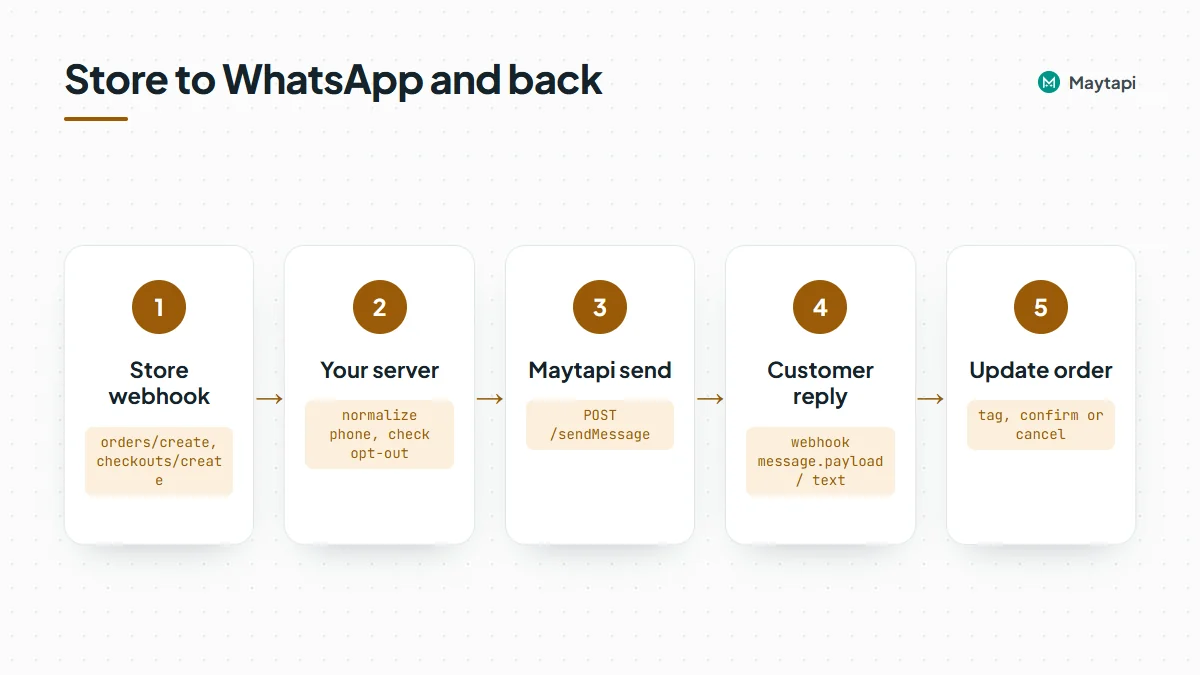
- Your store fires a webhook. Shopify can notify you about new checkouts and orders; WooCommerce has order webhooks under Settings > Advanced > Webhooks.
- Your server decides what to send. It reads the phone number, order number and total from the store payload, and checks your own opt-out list.
- Maytapi sends the WhatsApp message. One
POST /sendMessagerequest from your server, sent from your own WhatsApp number. - The customer replies. The reply arrives at your Maytapi webhook as a
messageevent, and your server updates the order.
All Maytapi calls use the base URL https://api.maytapi.com/api/PRODUCT_ID/PHONE_ID/ and your token in the x-maytapi-key header. If you would rather not run a server, the same chain works in n8n with the Maytapi community node: a store webhook trigger on one side, the Maytapi node on the other.
What to automate first
| Flow | Store trigger | WhatsApp message | Reply needed? |
|---|---|---|---|
| Order confirmation | Shopify orders/create, WooCommerce "Order created" |
"Thanks, order #1042 received" | No |
| COD confirmation | Same order event, payment method is COD | List with Confirm / Cancel | Yes |
| Shipping update | Shopify fulfillments/create, WooCommerce "Order updated" |
Tracking link | No |
| Abandoned cart | Shopify checkouts/create plus a delayed check |
Link back to the checkout | Optional |
COD confirmation usually pays off first. Every unconfirmed COD parcel that gets refused at the door costs you shipping both ways, and a one-tap confirmation catches most fake or impulse orders before they ship.
Normalize and check the phone number
Store checkouts collect phone numbers in every format: +90 530 123 45 67, 0530 123 4567, with or without the country code. Maytapi's to_number expects the country code followed by the national number, digits only, so normalize first:
function toWhatsAppNumber(raw, defaultCountry = "90") {
  let n = String(raw || "").replace(/\D/g, "");
  if (!n) return null;
  if (n.startsWith("00")) n = n.slice(2);
  else if (n.startsWith("0")) n = defaultCountry + n.slice(1);
  return n;
}
Then confirm the number is actually on WhatsApp before the first message to a new customer. checkPhones takes an array and returns one result per number:
curl -X POST "https://api.maytapi.com/api/$PRODUCT_ID/$PHONE_ID/checkPhones" \
  -H "x-maytapi-key: $TOKEN" \
  -H "Content-Type: application/json" \
  -d '{"numbers": ["4072xxxxx67"]}'
Each result has valid (true or false) and id._serialized, for example 4072xxxxx67@c.us, which you can pass straight to to_number. If the number is not valid, fall back to email or SMS and don't retry on WhatsApp. Cache the result per customer so you don't check the same number on every order. The bulk number check guide covers formats and large lists.
Send order notifications
Order confirmations and shipping updates are plain text messages. Point a Shopify orders/create webhook (or a WooCommerce "Order created" webhook) at your server and send one request per order:
import express from "express";

const { PRODUCT_ID, PHONE_ID, TOKEN } = process.env;
const base = `https://api.maytapi.com/api/${PRODUCT_ID}/${PHONE_ID}`;
const headers = { "x-maytapi-key": TOKEN, "Content-Type": "application/json" };

async function send(body) {
  const r = await fetch(`${base}/sendMessage`, { method: "POST", headers, body: JSON.stringify(body) });
  return r.json();
}

const app = express();

app.post("/shopify/orders-create", express.json(), async (req, res) => {
  res.sendStatus(200); // answer the store quickly, work afterwards
  const order = req.body;
  const phone = toWhatsAppNumber(order.phone || order.shipping_address?.phone);
  if (!phone || (await optedOut(phone))) return;

  await send({
    to_number: phone,
    type: "text",
    message: `Hi ${order.shipping_address?.first_name || ""}, this is Acme Store. ` +
      `We received order ${order.name} (${order.total_price} ${order.currency}). ` +
      `We'll message you when it ships. Reply STOP to stop these updates.`
  });
});
For WooCommerce, the order webhook body has the phone in billing.phone, the order number in number and the total in total; the sending part is the same. In production, verify the store's signature before trusting the payload: Shopify signs each webhook with the X-Shopify-Hmac-Sha256 header, WooCommerce with X-WC-Webhook-Signature. Both are an HMAC-SHA256 of the raw request body, so read the raw body for those routes.
sendMessage adds the message to your phone's sending queue and returns success: true right away. That means "queued", not "delivered". Delivery and read receipts come later to your webhook as ack events, described in the webhook events guide.
Confirm cash-on-delivery orders
When the order's payment method is cash on delivery (Shopify lists it in payment_gateway_names, usually as "Cash on Delivery (COD)", so match it case-insensitively; WooCommerce sends payment_method: "cod"), send a confirmation request instead of the plain notification and hold the order until the customer answers.
Use a list message, with a typed fallback
Reply buttons look like the obvious choice, but a button tap does not reach your webhook as a reply on every connection. List selections do: when the customer picks a row, the webhook receives a normal text message with the row title in message.text and your rowId in message.payload. So for a step your code depends on, send a list and also ask for a typed answer in the body:
curl -X POST "https://api.maytapi.com/api/$PRODUCT_ID/$PHONE_ID/sendMessage" \
  -H "x-maytapi-key: $TOKEN" \
  -H "Content-Type: application/json" \
  -d '{
    "to_number": "4072xxxxx67@c.us",
    "type": "list",
    "title": "Order #1042",
    "message": "Please confirm your cash-on-delivery order of 749.90 TRY. Reply 1 to confirm or 2 to cancel.",
    "footer": "Acme Store",
    "button_text": "Choose",
    "sections": [
      {
        "title": "Your order",
        "rows": [
          { "rowId": "cod_confirm_1042", "title": "Confirm order", "description": "Ship it, I will pay at the door" },
          { "rowId": "cod_cancel_1042", "title": "Cancel order" }
        ]
      }
    ]
  }'
Putting the order number into the rowId means the reply tells you which order it is about, even if the same customer has two open COD orders. The typed "1" or "2" is there for customers who answer before opening the list, and for any client that does not show the list well.
If you prefer reply buttons for the look, the request is the same with "type": "buttons" and buttons: [{ "id": "cod_confirm_1042", "text": "Confirm" }, ...]. Keep the "Reply 1 to confirm" line in the body either way, and test the tap on your own number first. The interactive messages guide explains the differences between the formats.
Handle the customer's answer
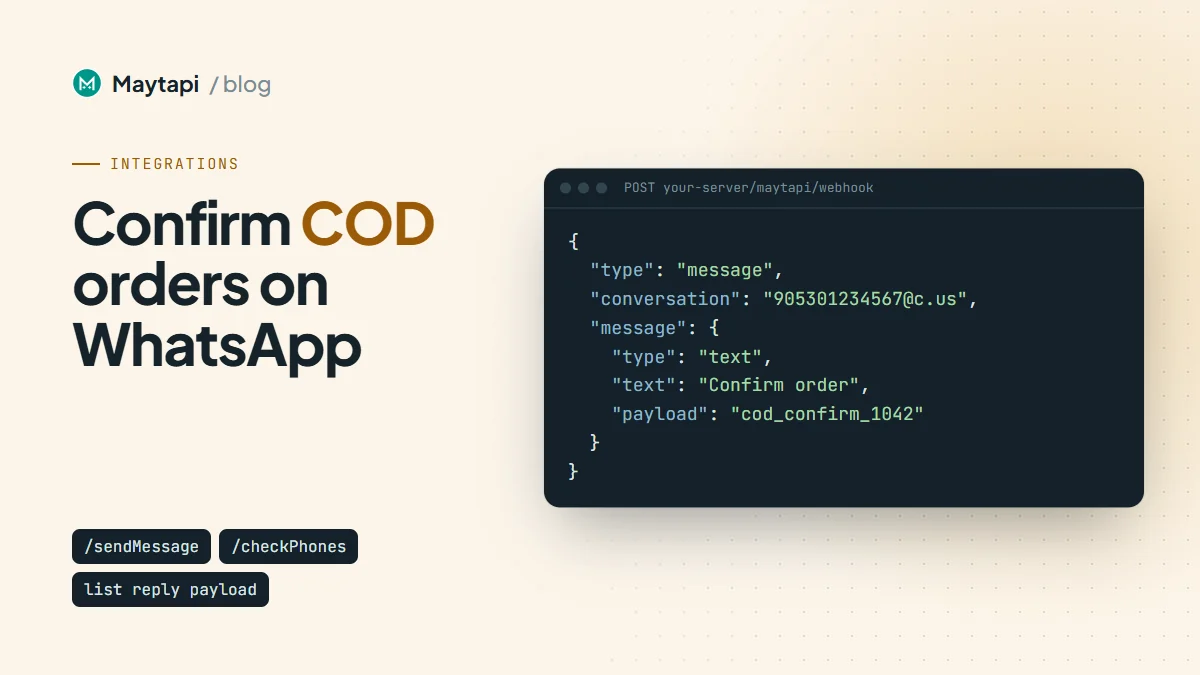
Set your Maytapi webhook once with setWebhook or in the console. Every incoming message arrives as a POST with type: "message", the chat in conversation, the sender in user, the content in message, and a ready reply URL for answering:
{
  "type": "message",
  "product_id": "your-product-id",
  "phone_id": 12345,
  "conversation": "4072xxxxx67@c.us",
  "user": { "id": "4072xxxxx67@c.us", "name": "Ayse", "phone": "4072xxxxx67" },
  "message": {
    "type": "text",
    "text": "Confirm order",
    "payload": "cod_confirm_1042",
    "fromMe": false,
    "id": "3EB081AF26FADE6416D8"
  },
  "reply": "https://api.maytapi.com/api/your-product-id/12345/sendMessage",
  "timestamp": 1761568800
}
A typed answer looks the same without payload. The handler reads the row id first and falls back to the text:
app.post("/maytapi/webhook", express.json(), async (req, res) => {
  res.sendStatus(200);
  const { type, message, conversation, user, reply } = req.body;
  if (type !== "message" || message?.fromMe || message?.type !== "text") return;

  const phone = user?.phone || conversation.split("@")[0];
  const text = (message.text || "").trim().toLowerCase();

  if (["stop", "unsubscribe"].includes(text)) return addOptOut(phone);

  let action, orderId;
  const m = /^cod_(confirm|cancel)_(\d+)$/.exec(message.payload || "");
  if (m) [, action, orderId] = m;
  else if (text === "1" || text === "2") {
    orderId = await latestPendingCodOrder(phone); // your lookup by phone
    action = text === "1" ? "confirm" : "cancel";
  }
  if (!orderId) return; // not a COD answer, leave it for a human

  await markOrder(orderId, action); // e.g. tag or cancel the order in your store
  await fetch(reply, {
    method: "POST",
    headers,
    body: JSON.stringify({
      to_number: conversation,
      type: "text",
      message: action === "confirm" ? "Thanks, your order is confirmed." : "Your order has been cancelled."
    })
  });
});
latestPendingCodOrder and markOrder stand for your own database and store API calls, for example adding a "COD confirmed" tag to the Shopify order or moving the WooCommerce order to processing. Set a deadline as well: if there is no answer within a few hours, send one reminder, and after that let your team call the customer instead of shipping blind.
Occasionally conversation is a privacy ID ending in @lid rather than a phone-number chat. When the number is missing, the LID to phone number guide shows how to resolve it, and the order id in payload still tells you which order the answer belongs to.
Recover abandoned carts
Shopify does not send an "abandoned" event. It sends checkouts/create and checkouts/update when a customer starts a checkout, and the checkout carries abandoned_checkout_url, a link that restores the cart. The pattern is to schedule a check:
Shopify treats checkout and order webhooks as protected customer data, so an app that subscribes to them needs that access approved in its Shopify app settings first.
- On
checkouts/create, store the checkouttoken, the phone number andabandoned_checkout_url, and schedule a job for, say, one hour later. - When an order arrives, it has a
checkout_token. Mark that checkout as completed. - When the job runs and the checkout is still not completed, send one message with the recovery link.
await send({
  to_number: phone,
  type: "text",
  message: `Hi, this is Acme Store. You left a few items in your cart. ` +
    `You can finish your order here: ${checkout.abandoned_checkout_url} ` +
    `Reply STOP if you'd rather not get these messages.`
});
Send one reminder per checkout, not a series. The customer has never chatted with your number before, so this is exactly the kind of cold, link-carrying message WhatsApp watches most closely. Consent to order updates is not consent to marketing, and a cart reminder counts as marketing under GDPR and similar rules, so only send it to customers who ticked a separate opt-in for WhatsApp reminders at checkout, and keep the daily volume moderate. In the first two Safe Mode tiers, links in first messages are blocked, so on a freshly connected number send the reminder without the link and share it when the customer replies.
WooCommerce core has no checkout-started webhook, so it has no abandoned cart trigger out of the box. You need a cart-recovery plugin that captures the phone number and calls your server, or your own hook in the checkout page.
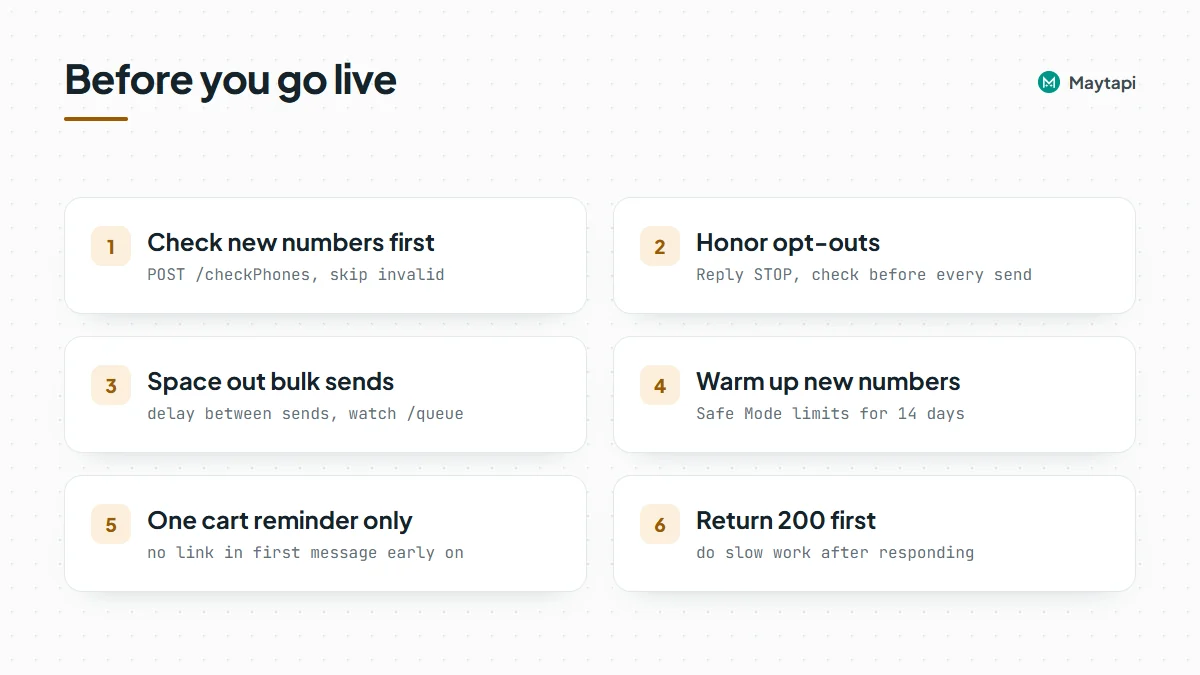
Keep your number safe
Store automation runs every day, so a small mistake repeats hundreds of times. A few rules:
- Check before the first send. Run
checkPhoneson new customers and skip invalid numbers instead of retrying. - Honor opt-outs everywhere. End marketing-type messages with "Reply STOP", save the opt-out in your handler, and check the list before every send, including order updates.
- Space out bulk sends. Order events are naturally spread out, but a flash sale or a backlog of abandoned checkouts is not. Add a delay between sends, as in the broadcast API guide, and watch
GET /queueso the backlog does not pile up. - Turn on Safe Mode for new numbers. It paces a new number through a 14-day warm-up with per-minute, daily and new-chat limits; the ban prevention and Safe Mode guide explains the tiers.
- Prefer replies over new conversations. COD confirmations and shipping updates are expected; repeated promotions to people who never wrote to you are what gets numbers restricted.
- Acknowledge webhooks first. Both your store and Maytapi expect a quick 200. Do the slow work after responding.
Next steps
- Learn every field of
messageandackevents in the webhook events guide. - Compare buttons, lists and carousels in Send WhatsApp Buttons, Lists and Carousels via API.
- Build the same flows without code in WhatsApp automation with n8n.
- Sell directly in chat with WhatsApp catalog and order webhooks.
- Pace larger sends with the WhatsApp broadcast API guide.
- Check every endpoint in the API documentation.