Maytapi
On October 1, 2026, Meta started charging again for two kinds of WhatsApp Business Platform messages that had been free: the replies a business sends inside the 24-hour customer service window, and utility templates sent in response to a customer. For a support bot or an online store that mostly answers customers, that can turn a WhatsApp bill that used to be close to zero into a real monthly line item. This post explains what changed, shows how to estimate your own cost with Meta's published rates, and compares that with a flat-priced API like Maytapi, including the cases where the official API is still the better choice.
We run Maytapi, an unofficial WhatsApp API, so we have an interest here. Every Meta fact below comes from Meta's own WhatsApp pricing documentation and its rate cards effective October 1, 2026. Rates change, so check them yourself before you budget. Maytapi's own current prices are always on our pricing page.
What changed on October 1, 2026
Meta has billed the WhatsApp Business Platform (Cloud API) per delivered message since July 1, 2025. The price depends on the message category (marketing, utility, authentication, service) and on the recipient's country calling code, which Meta calls the market. Messages from customers to your business are not charged.
The October 2026 update changed three things:
- Service messages are charged again, after a free tier. Service messages are the free-form, non-template replies you send while a customer service window is open. They had been free since November 1, 2024. Since October 1, 2026, each business phone number gets 1,000 free delivered service messages per month. From the 1,001st, every delivered service message is charged. Unused free messages do not roll over.
- Utility templates inside the service window are charged. Order confirmations, shipping updates and similar utility templates sent in reply to a customer had been free since July 1, 2025. They are now billed at the normal utility rate, with no free allowance.
- Rate card updates. Meta changed 40 rates across markets, moved several countries out of "Rest of" regions into their own rates, and added authentication-international rates in more markets.
Meta also asked businesses to add a payment method by September 30, 2026. Without one, Meta delivers service messages up to the free tier and stops delivering them after that.
A few things still cost nothing on the official side: incoming messages, messages in a free entry point window (opened when someone contacts you from a Click-to-WhatsApp ad or a Facebook Page call-to-action button), and, through December 31, 2027, service messages from eligible government and non-profit organizations. The full list is in Meta's pricing documentation.
How to estimate your Meta bill
For one business phone number, the monthly cost on the Cloud API comes down to this:
Meta cost =
    max(0, service messages - 1,000) x service rate
  + utility templates                x utility rate
  + marketing templates              x marketing rate
  + authentication templates         x auth rate
  (+ your Business Solution Provider's fees, if you use one)
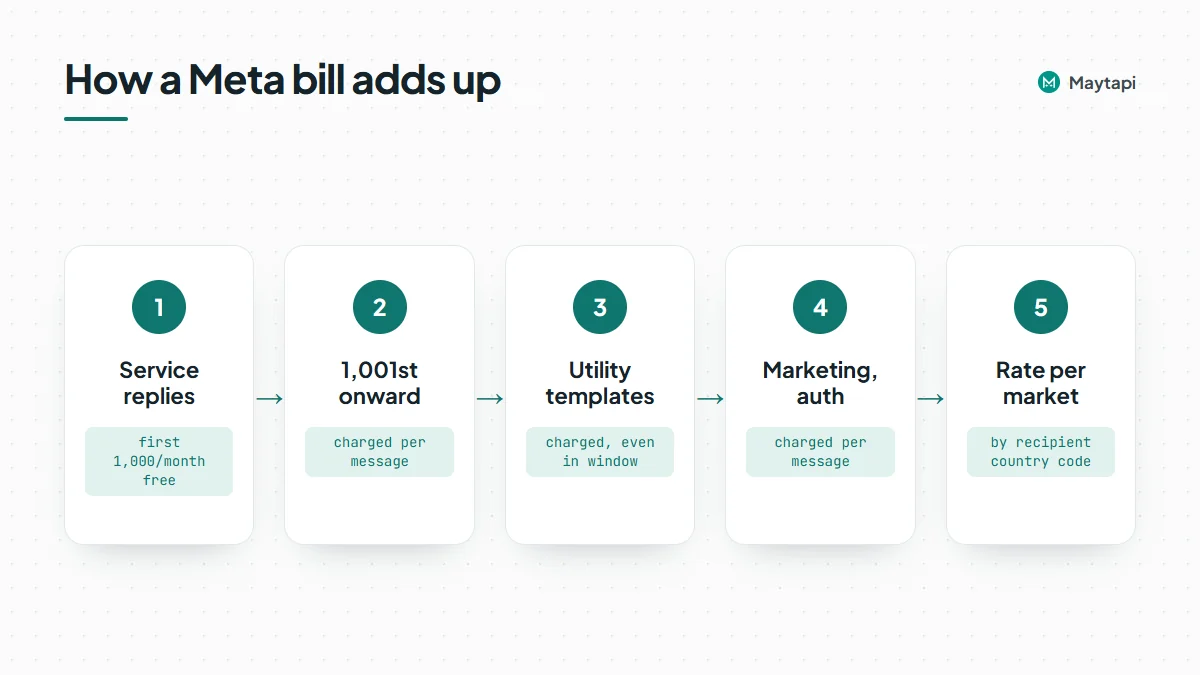
Each rate is the one for the recipient's market. Only delivered messages count. Utility and authentication messages get volume tier discounts at high monthly volumes, starting above 100,000 utility messages in the UK and Germany, for example. Service and marketing messages have no volume tiers.
Here are the October 1, 2026 USD list rates for four markets, taken from Meta's rate card. In these four markets the service rate is the same as the utility rate.
| Market (Meta rate card) | Service | Utility | Marketing |
|---|---|---|---|
| United Kingdom | $0.0220 | $0.0220 | $0.0635 |
| Germany | $0.0550 | $0.0550 | $0.1365 |
| North America | $0.0034 | $0.0034 | $0.0250 |
| India | $0.0014 | $0.0014 | $0.0118 |
These are illustrative. Meta publishes rates in several currencies, updates them on a regular calendar, and your actual charge depends on where each recipient's number is registered.
Worked example 1: a support bot
Assumptions:
- One business phone number.
- 2,000 customer support chats per month, all started by the customer.
- The bot and agents send 5 replies per chat on average: 10,000 service messages per month.
- No templates, no ad-driven chats, no Business Solution Provider fees.
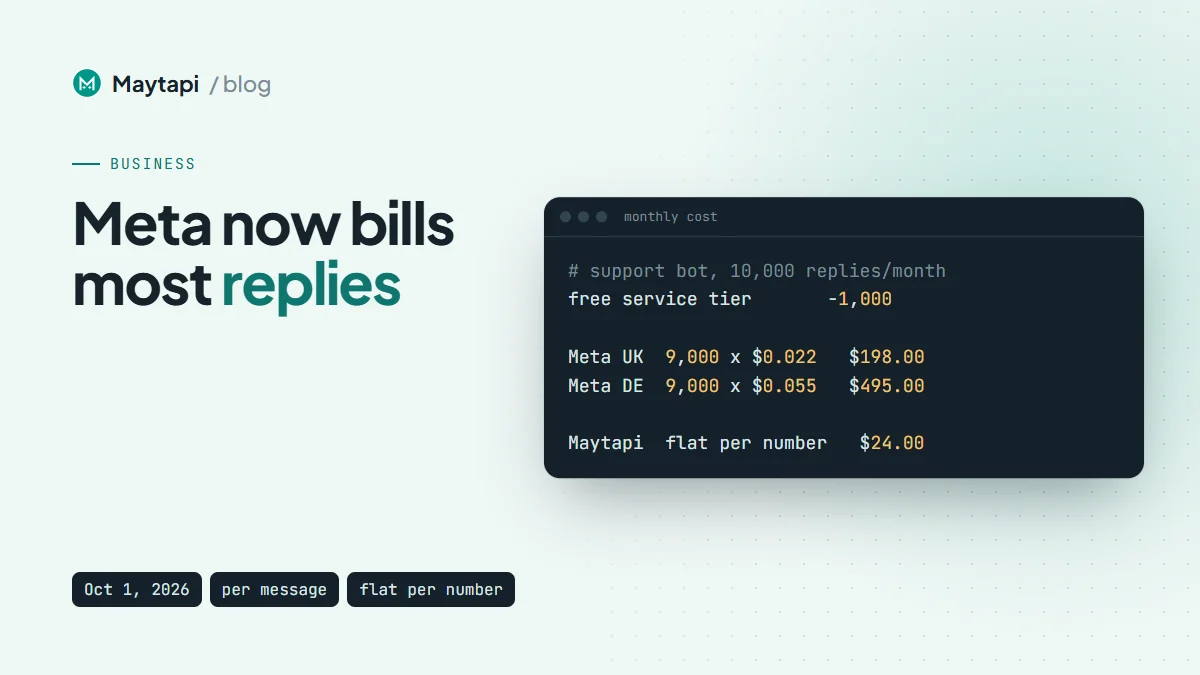
Meta charges for 10,000 - 1,000 = 9,000 service messages.
| Market | Billable service messages | Meta cost per month | Maytapi per month |
|---|---|---|---|
| United Kingdom | 9,000 x $0.0220 | $198.00 | $24 (annual) or $29 (monthly) |
| Germany | 9,000 x $0.0550 | $495.00 | $24 (annual) or $29 (monthly) |
| North America | 9,000 x $0.0034 | $30.60 | $24 (annual) or $29 (monthly) |
| India | 9,000 x $0.0014 | $12.60 | $24 (annual) or $29 (monthly) |
Before October 1, the same bot cost nothing in Meta fees in every row, because all of these messages were free service replies. Now a UK support desk at this volume pays about $198 a month, and a German one about $495.
The table also shows where a flat price does not help. In North America the two are close, and in India the Meta bill is lower than a Maytapi subscription at this volume.
At what volume does a flat price win?
Volume decides it. Below 1,000 service replies a month, a number pays Meta nothing, so a small desk that only answers a few messages a day is cheaper on the Cloud API. Above the free tier, each reply adds the service rate, and the point where the Meta bill passes $24 (one Maytapi number on the annual plan) is 1,000 + 24 ÷ service rate:
| Market | Service rate | Maytapi is cheaper above |
|---|---|---|
| Germany | $0.055 | ~1,450 replies a month |
| UK | $0.022 | ~2,100 replies a month |
| North America | $0.0034 | ~8,100 replies a month |
| India | $0.0014 | ~18,100 replies a month |
These thresholds count service replies only. Utility and marketing templates are billed from the first message at higher rates, so a business that also sends order updates or campaigns reaches the break-even point much sooner, as the next example shows.
Worked example 2: an e-commerce store
Assumptions:
- One business phone number.
- 50,000 outgoing messages per month:
- 30,000 service replies (questions about sizes, stock, returns);
- 15,000 utility templates (order confirmations and shipping updates);
- 5,000 marketing templates (back-in-stock and promotional messages to opted-in customers).
- Utility volume stays below the first volume tier, so list rates apply.
| Market | Service (29,000 billable) | Utility (15,000) | Marketing (5,000) | Meta total per month |
|---|---|---|---|---|
| United Kingdom | $638.00 | $330.00 | $317.50 | $1,285.50 |
| Germany | $1,595.00 | $825.00 | $682.50 | $3,102.50 |
| North America | $98.60 | $51.00 | $125.00 | $274.60 |
| India | $40.60 | $21.00 | $59.00 | $120.60 |
On Maytapi, the same number costs $24 a month on the annual plan or $29 billed monthly, with unlimited messages. A store sending 50,000 messages a month may want to spread that load over two or three numbers to keep each one healthy (more on that below). Even at three numbers, that is $72 a month on the annual plan, which is still well below the Meta total in the UK and Germany and below it in North America and India too. The comparison counts fees only. The 5,000 marketing messages are the part least suited to an unofficial number, because promotional sends carry the most ban risk, and a restricted number costs you its chat history and the time to re-link and warm up a new one.
Why a flat price is simpler to plan
The bigger difference is not only the total. It is how much you have to track to know the total.
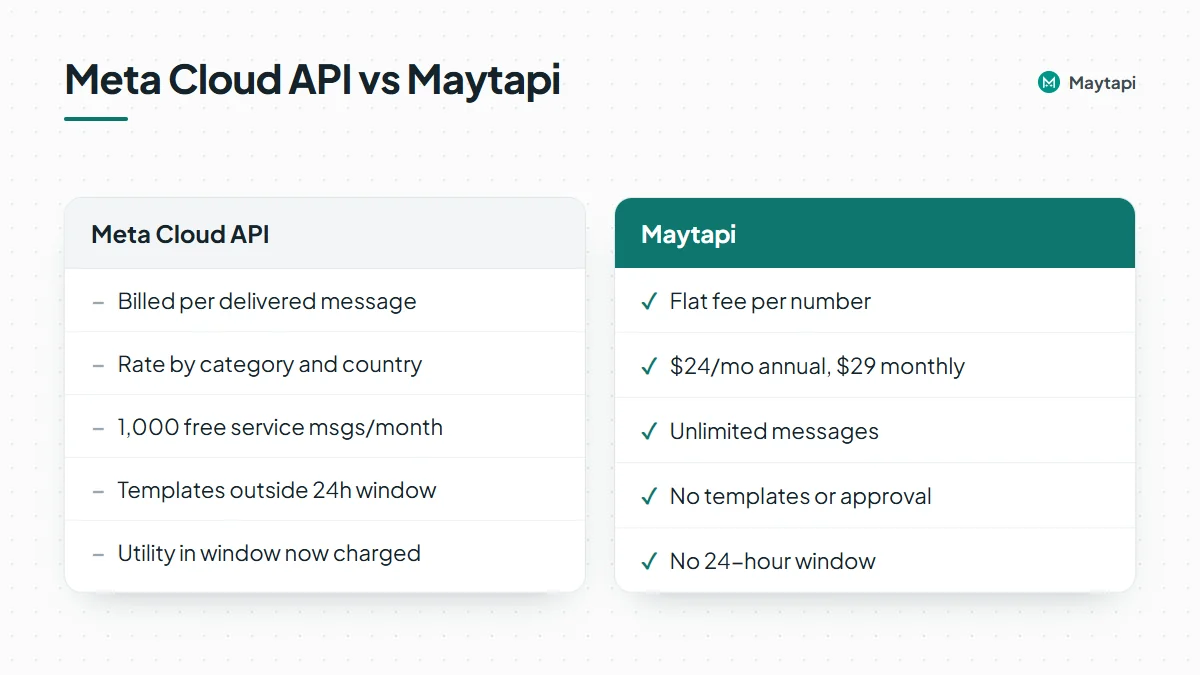
On the Cloud API, your bill depends on how many replies your bot sends per conversation, which category Meta assigns to each template, which countries your customers are in, whether a chat started from an ad, and which volume tier you reached. A chattier bot or a new market changes next month's cost. That is a reasonable design for Meta's platform, but it means finance and engineering both have to watch it.
With Maytapi you pay per connected number, and that is the whole bill:
- One price per number. $24 per number per month on the annual plan, $29 on the monthly plan. A reply, a reminder and a promotion cost the same: nothing extra.
- No templates or approval. You can start a conversation with a free-form message. There is no template review and no category to be billed under.
- No 24-hour window. You can reply to a customer the next day or a week later without switching to a template.
- Your existing number. You scan a QR code with the phone that already runs your WhatsApp or WhatsApp Business number. The phone keeps working alongside the API.
- More than one-to-one chat. Groups, channels, communities, status, labels and the catalog are available on the same number.
Sending a message is a single call to POST /sendMessage with your PRODUCT_ID, PHONE_ID and TOKEN. Our WhatsApp Business API alternative page compares setup, features and risk side by side.
The trade-offs
A lower, flat price comes with real differences. You should weigh them before you move anything.
Maytapi is an unofficial API. It connects your number to WhatsApp as a linked device, the same way WhatsApp Web does. Meta does not operate, approve or endorse it, and WhatsApp does not endorse third-party clients that automate personal or WhatsApp Business app accounts. If a number sends cold outreach, identical bulk messages, or a sudden burst of volume, WhatsApp can restrict or ban it, and no provider can reverse that. You are responsible for consent and for following WhatsApp's terms.
That risk is manageable for most support and order-update traffic, because the customer usually wrote to you first. It needs more care for outbound campaigns:
- Message people who opted in, and warm up new numbers gradually. Our guide to avoiding WhatsApp bans with Safe Mode covers pacing and limits.
- Clean your list first. A bulk WhatsApp number check removes numbers that are not on WhatsApp before you send anything.
- Spread heavy volume across several numbers rather than pushing one number hard.
The official Cloud API is the better choice when:
- you need the verified Official Business Account badge, or a vendor your legal or compliance team knows is operated by Meta;
- you work in a regulated industry, such as banking, insurance or healthcare, where an unofficial channel is not acceptable;
- you send very high volumes of opt-in marketing and can live with template review and per-message billing;
- your customers are mainly in low-rate markets and you mostly reply to inbound messages, as in the India and North America rows above;
- you rely on Click-to-WhatsApp ads, whose free entry point window can make ad-driven conversations free;
- losing a number would be unacceptable for your business.
Some companies use both: the official API for regulated or large-scale marketing, and Maytapi on a separate number for support, groups and day-to-day automation that has become expensive or impossible on the Cloud API.
How to switch or start
If the numbers above look like your situation, you can test the flat-price route without moving your existing setup:
- Create an account and connect a number by scanning the QR code. The getting started guide walks through it, and the free trial runs for 3 days with no card.
- Send a first message with
POST /sendMessageusing the examples in how to send a WhatsApp message with the API. - Point your webhook at your bot or helpdesk so incoming messages reach the same logic that handles your Cloud API traffic today.
- Compare a month of real volume against your Meta invoice, using the formula above and your own markets.
Keep in mind that a number registered to the Cloud API is set up differently from one used in the WhatsApp app. Moving the same number between the two takes planning. Starting the trial on a second number is the low-risk way to compare.
Next steps
- Check your own Meta rates in the WhatsApp pricing documentation and plug them into the formula above.
- See Maytapi pricing: $24 per number per month billed annually, $29 billed monthly, unlimited messages.
- Read the WhatsApp Business API alternative page if you are still deciding.
- Start a free trial and connect a test number in a few minutes.