Maytapi
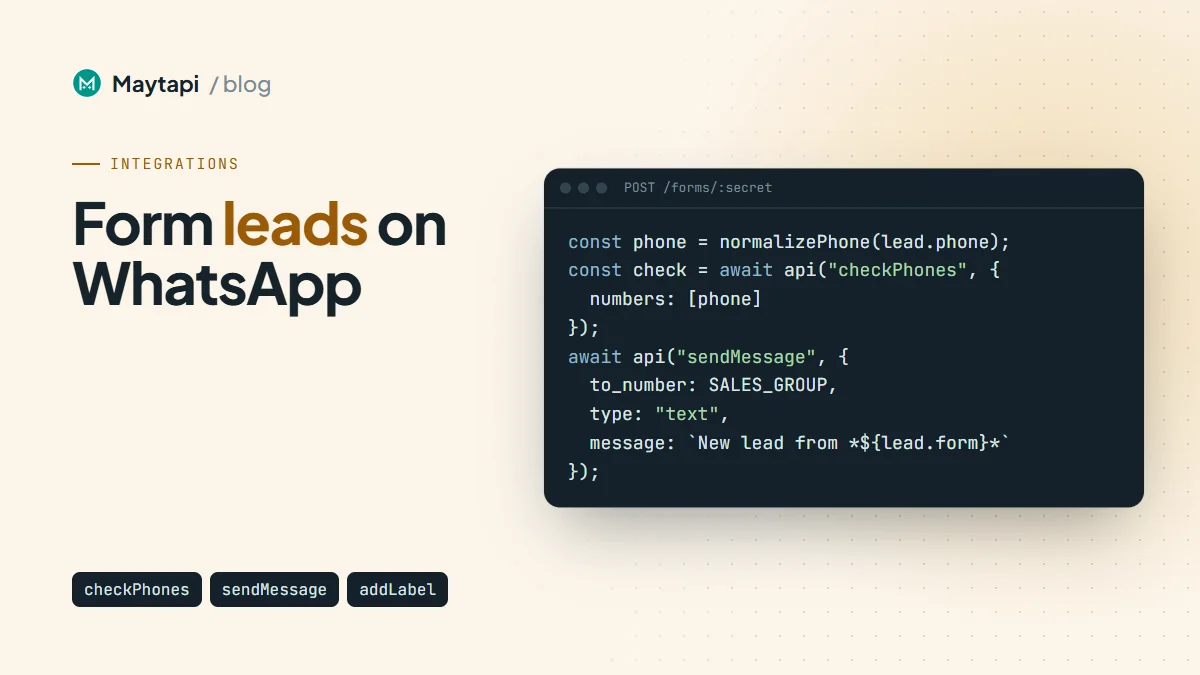
Someone fills in your contact form, gets a generic "thanks, we'll be in touch" page, and then waits. Meanwhile the lead sits in an inbox until someone on the sales team notices it. WhatsApp closes that gap on both sides: the person who submitted the form gets a confirmation on their phone within seconds, and your sales group gets a lead alert where they already talk. This guide shows how to send WhatsApp messages from form submissions with Tally, Typeform, Google Forms or a WordPress or Drupal form: a small Node.js endpoint receives the form's webhook, cleans up the phone number, checks it with POST /checkPhones, sends both messages and labels the chat for follow-up.
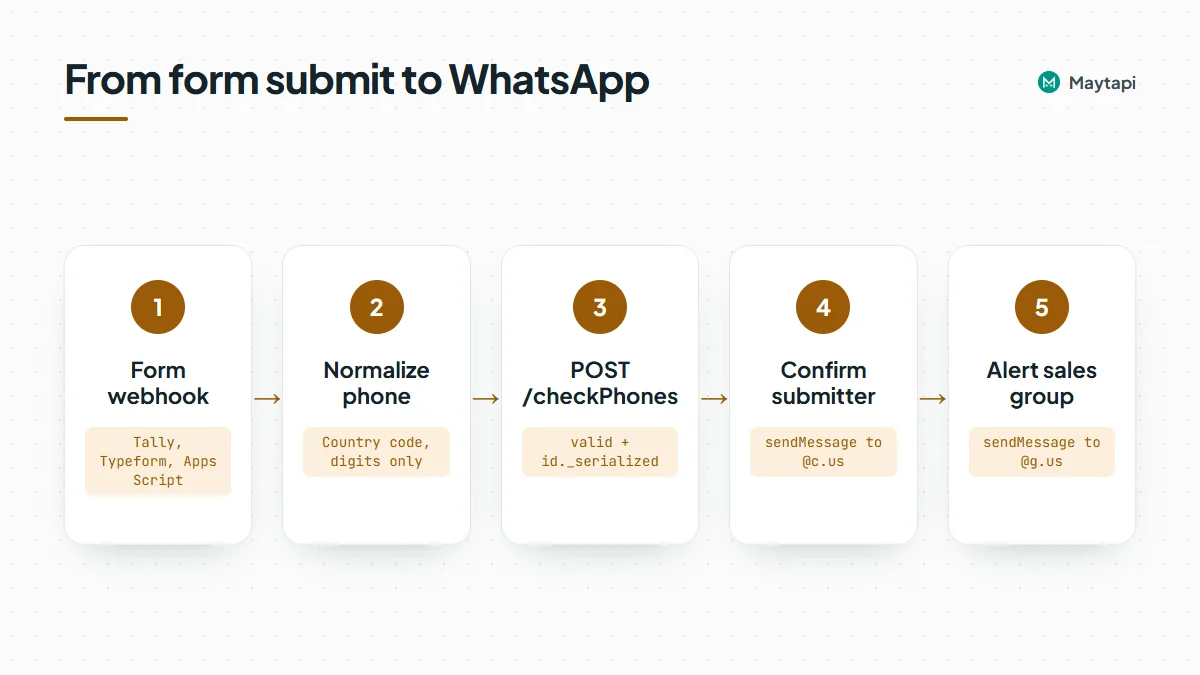
How the flow works
Every form tool can call a URL when a form is submitted, either built in or through a plugin or script. Point that call at your own small endpoint, not at Maytapi directly. Your endpoint knows your token, your sales group and your rules, and it can turn each tool's payload into the same shape before anything is sent.
| Step | What happens | Maytapi endpoint |
|---|---|---|
| 1 | The form tool posts the submission to your endpoint | |
| 2 | Your code maps fields and normalizes the phone number | |
| 3 | Check that the number is on WhatsApp | POST /checkPhones |
| 4 | Send a confirmation to the person who submitted | POST /sendMessage |
| 5 | Send a lead alert to the sales group | POST /sendMessage with an @g.us id |
| 6 | Optionally label the chat for follow-up | POST /addLabel |
All Maytapi calls go to https://api.maytapi.com/api/PRODUCT_ID/PHONE_ID/ with your token in the x-maytapi-key header. If you haven't connected a number yet, start with getting started.
Only message people who gave you their number for this purpose. Add a line under the phone field such as "We'll confirm your request on WhatsApp" so the message is expected, not a surprise.
Map the form fields
Each form tool sends its own JSON, so the first job of your endpoint is to pull out the same four values every time: name, phone, email and whatever the person asked about. Keep the per-tool details in one mapping function and let the rest of the code work on a clean object.
| Form source | How it reaches your endpoint | Where the answers are |
|---|---|---|
| Tally | Webhook integration on the form | data.fields, an array with label, type and value |
| Typeform | Webhook in the form's Connect settings | form_response.answers, matched by field id or ref |
| Google Forms | Apps Script onFormSubmit trigger posting with UrlFetchApp |
Item titles and responses you choose to send |
| WordPress | A form plugin's webhook or "remote post" option, sometimes as an add-on | Usually a flat object keyed by field name |
| Drupal Webform | The Remote post handler | Submission values keyed by element key |
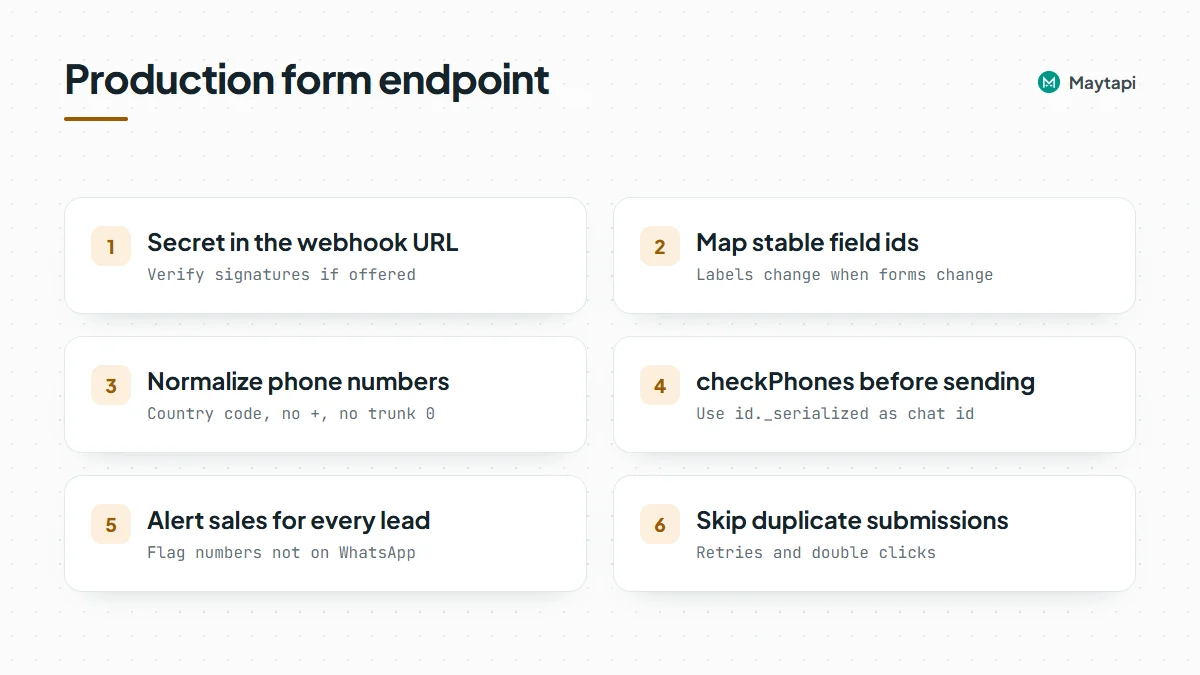
Field labels change when someone edits the form, so match on something stable where the tool offers it, such as a field id, a ref or the field type. Log the raw body of your first test submission from each tool and build the mapping from what you actually receive.
Here is a trimmed Tally submission, showing only the parts this guide uses:
{
  "eventType": "FORM_RESPONSE",
  "data": {
    "formName": "Request a demo",
    "fields": [
      { "key": "question_1", "label": "Name", "type": "INPUT_TEXT", "value": "Ayse" },
      { "key": "question_2", "label": "Phone", "type": "INPUT_PHONE_NUMBER", "value": "+90532xxxxx67" },
      { "key": "question_3", "label": "Company size", "type": "INPUT_TEXT", "value": "10-50" }
    ]
  }
}
Normalize the phone number
Maytapi expects international format: country code followed by the national number, digits only, with no +, spaces, dashes or brackets. Form fields return anything from +90 530 123 45 67 to 0530 123 45 67. A phone-type field with a country picker helps a lot, but plain text fields are common on WordPress and Drupal sites.
function normalizePhone(raw, defaultCc = "90") {
  const s = String(raw || "").trim();
  const digits = s.replace(/\D/g, "");
  if (!digits) return null;
  if (s.startsWith("+")) return digits;
  if (digits.startsWith("00")) return digits.slice(2);
  if (digits.startsWith("0")) return defaultCc + digits.slice(1);
  return digits;
}
normalizePhone("0530 123 45 67") returns 90532xxxxx67. Set defaultCc to the country most of your visitors are in, or better, use a phone field with a country selector so you rarely need the fallback. The bulk number check guide has more formatting traps, such as a trunk 0 left in after the country code.
Check the number with checkPhones
A normalized number can still be wrong. People mistype, and some numbers simply aren't on WhatsApp. POST /checkPhones takes an array of numbers and returns one result per number. Checking sends nothing to the person.
curl -X POST "https://api.maytapi.com/api/$PRODUCT_ID/$PHONE_ID/checkPhones" \
  -H "x-maytapi-key: $TOKEN" \
  -H "Content-Type: application/json" \
  -d '{"numbers": ["90532xxxxx67"]}'
{
  "success": true,
  "data": [
    {
      "status": "valid",
      "valid": true,
      "id": { "server": "c.us", "user": "90532xxxxx67", "_serialized": "90532xxxxx67@c.us" }
    }
  ]
}
If valid is true, use id._serialized as the chat id for the confirmation and the label. If it's false, don't drop the lead: send the sales alert anyway with a note that the number isn't on WhatsApp, so someone can call or email instead.
Build the endpoint in Node.js
The handler below accepts a Tally-style body, but only mapSubmission knows that. Swap it for your own mapping for other tools.
import express from "express";

const { PRODUCT_ID, PHONE_ID, TOKEN, FORM_SECRET } = process.env;
const BASE = `https://api.maytapi.com/api/${PRODUCT_ID}/${PHONE_ID}`;
const headers = { "x-maytapi-key": TOKEN, "Content-Type": "application/json" };
const SALES_GROUP = "120363012345678901@g.us";
const NEW_LEAD_LABEL = "3"; // from GET /getLabels, optional

async function api(path, body) {
  const r = await fetch(`${BASE}/${path}`, { method: "POST", headers, body: JSON.stringify(body) });
  return r.json();
}

function mapSubmission(body) {
  if (body?.source === "google-forms") { // from the Apps Script below
    const a = body.answers || {};
    return { form: "Google Form", name: a["Name"] || "there", phone: a["Phone"], topic: a["Company size"] || "" };
  }
  const fields = body?.data?.fields || [];
  const byLabel = (l) => fields.find((f) => f.label === l)?.value;
  const phoneField = fields.find((f) => f.type === "INPUT_PHONE_NUMBER");
  return {
    form: body?.data?.formName || "Website form",
    name: byLabel("Name") || "there",
    phone: phoneField?.value || byLabel("Phone"),
    topic: byLabel("Company size") || ""
  };
}

// At most one confirmation per number per 10 minutes and 3 per day,
// so nobody can use your form to flood someone else's phone.
const sent = new Map(); // phone -> { day, count, last }
function allowConfirmation(phone) {
  const day = new Date().toISOString().slice(0, 10);
  const prev = sent.get(phone);
  const today = prev && prev.day === day ? prev : { day, count: 0, last: 0 };
  if (today.count >= 3 || Date.now() - today.last < 10 * 60 * 1000) return false;
  sent.set(phone, { day, count: today.count + 1, last: Date.now() });
  return true;
}

const app = express();
app.post("/forms/:secret", express.json(), async (req, res) => {
  if (req.params.secret !== FORM_SECRET) return res.sendStatus(404);
  res.sendStatus(200); // answer the form tool quickly

  try {
    const lead = mapSubmission(req.body);
    const phone = normalizePhone(lead.phone);

    let chatId = null;
    if (phone) {
      const check = await api("checkPhones", { numbers: [phone] });
      const hit = check.success && check.data?.[0];
      if (hit?.valid) chatId = hit.id._serialized;
    }

    if (chatId && allowConfirmation(chatId)) {
      await api("sendMessage", {
        to_number: chatId,
        type: "text",
        message: `Hi ${lead.name}, thanks for your request on *${lead.form}*. ` +
          `Our team will reach out shortly. Reply here if you have any questions.`
      });
      if (NEW_LEAD_LABEL) {
        const label = await api("addLabel", { label_id: NEW_LEAD_LABEL, conversation_id: chatId });
        if (!label.success) console.warn("addLabel failed (Business account?):", label.message);
      }
    }

    await api("sendMessage", {
      to_number: SALES_GROUP,
      type: "text",
      message: `New lead from *${lead.form}*\n` +
        `Name: ${lead.name}\nPhone: ${phone || lead.phone || "-"}\n` +
        `Details: ${lead.topic || "-"}\n` +
        (chatId ? "Confirmation sent on WhatsApp." : "Not on WhatsApp, follow up by phone or email.")
    });
  } catch (err) {
    console.error("form handler failed", err);
  }
});

app.listen(3000);
normalizePhone is the function from the previous section. A few notes on the code:
- Don't let the form message strangers. Anyone can type someone else's number into a public form. The
allowConfirmationcap above (kept in memory here; use Redis or your database in production) limits the damage, and a CAPTCHA on the form stops bots. Put a consent line such as "I agree to receive a WhatsApp message about my request" next to the phone field and send nothing without it. - Answer first, work after. Form tools expect a fast response and may retry or flag the webhook if your endpoint is slow. Return 200, then call Maytapi.
- Protect the URL. A secret in the path is the simplest guard, because every form tool lets you paste a full URL. If the tool signs its requests (Tally and Typeform both offer a signing secret), verify the signature as well.
- Check
successon every call. Maytapi answers HTTP 200 withsuccess: falseand amessagewhen something goes wrong, so read the body, not just the status code. success: truemeans queued. A sent message is accepted into your phone's sending queue. Delivery and read receipts arrive later on your webhook, as described in the send message guide.
The sales group alert
The lead alert is a normal text message with the group id as to_number. The group id ends in @g.us; list your groups with GET /getGroups to find it. Your connected number must be a member, and if the group only lets admins send, an admin. The group messaging guide covers both. Use *bold* for the form name and keep one field per line so the alert reads well on a phone.
Label the chat for follow-up
Labels are a WhatsApp Business feature, so POST /addLabel only works when the connected number is a WhatsApp Business account. Find the label's id with GET /getLabels (or create one with POST /createLabel), then attach it with label_id and conversation_id. Your sales team sees "New lead" on the chat in WhatsApp Business, and your code can list every labeled chat later with GET /getLabels/{label_id}. The labels and CRM sync guide shows how to move contacts between stages from there.
Google Forms with Apps Script
Google Forms has no webhook setting, but Apps Script fills the gap. Open the form, go to the script editor, add the function below and create an installable trigger for it ("From form", "On form submit").
function onFormSubmit(e) {
  const answers = {};
  e.response.getItemResponses().forEach(function (r) {
    answers[r.getItem().getTitle()] = r.getResponse();
  });
  UrlFetchApp.fetch("https://example.com/forms/YOUR_FORM_SECRET", {
    method: "post",
    contentType: "application/json",
    payload: JSON.stringify({ source: "google-forms", answers: answers })
  });
}
This posts to the same endpoint, so the Maytapi token stays on your server, not in the script. The google-forms branch at the top of mapSubmission reads answers["Name"] and answers["Phone"]; use the exact question titles of your form.
WordPress and Drupal forms
On WordPress, the options depend on the form plugin: some have a webhook feature built in, others offer it as an add-on, and some need a small custom hook. On Drupal, Webform's Remote post handler sends submissions to a URL you configure. In both cases point the request at your endpoint, send JSON if the plugin allows it, and map the field names you set on the form. If the plugin can only send form-encoded data, add express.urlencoded({ extended: true }) to the route.
Practical tips
- Avoid duplicates. People double-click submit and form tools retry. Store a submission id or the phone plus form name for a few minutes and skip repeats, so nobody gets two confirmations.
- Keep the confirmation short and specific. Name the form or request, say what happens next and invite a reply. A reply turns the chat into a real conversation, and your webhook receives it as a normal
messageevent. - Ask for a typed answer when you need one. "Reply 1 to book a call" works on every connection and arrives as text. If you want menus, the interactive messages guide explains why lists are more reliable than reply buttons.
- Watch volume on new numbers. Maytapi is an unofficial API, so the number you connect can be restricted, and a sudden burst of first messages from a fresh number looks like spam to WhatsApp. Keep first messages expected and paced. Read how to avoid WhatsApp bans with Safe Mode before you put the form on a busy landing page.
- Prefer no code? The same steps fit an n8n workflow: a Webhook trigger node, a small Code node for the phone, and HTTP Request nodes for Maytapi.
Next steps
A form-to-WhatsApp endpoint is a small piece of code with a visible payoff: leads hear from you in seconds and your team sees them where they already work. Map the fields, normalize the phone, check it with checkPhones, then send the confirmation, the group alert and the label.
- Clean and verify numbers at scale with the bulk WhatsApp number check.
- Format group alerts and mentions with send a message to a WhatsApp group.
- Keep lead stages in sync with the labels and CRM sync guide.
- Handle replies from new leads with the webhook events guide.
- Check every parameter in the API documentation.