Maytapi
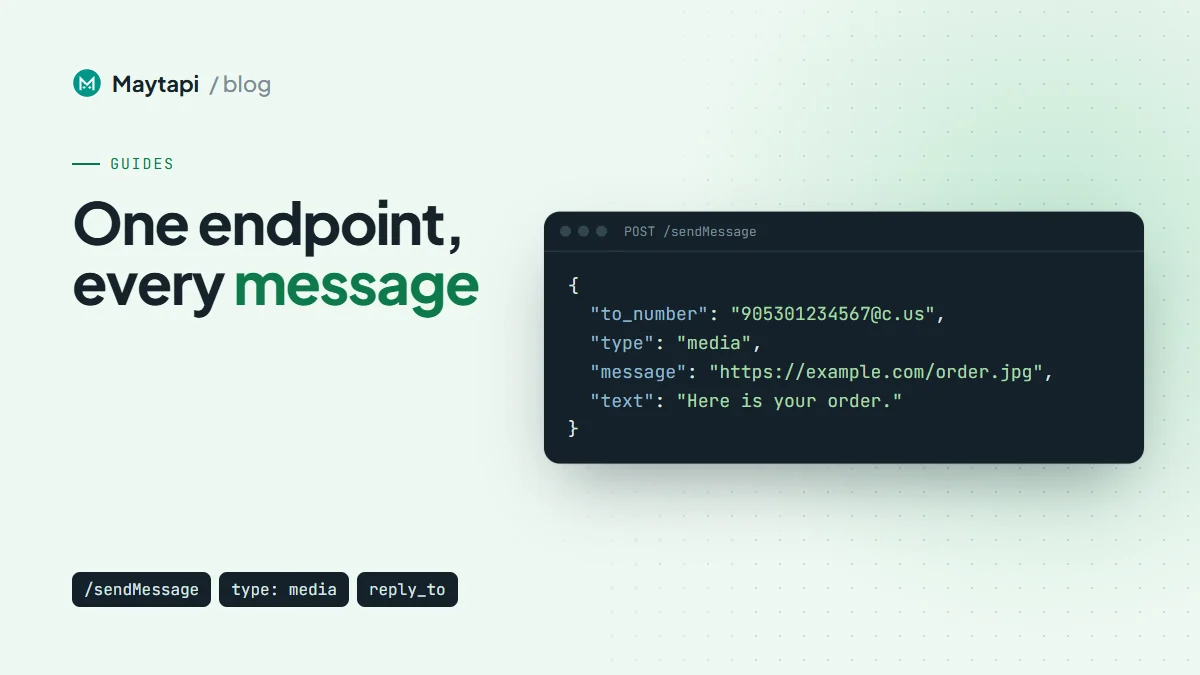
Every message your code sends through Maytapi goes through one endpoint: POST /sendMessage. The type field decides what the recipient sees, whether that's a line of text, a PDF, a voice note, a poll, or a reaction to a message they sent you. This guide covers how to send WhatsApp messages with the API: each one-to-one message type with a working request body, the recipient formats to_number accepts, what the response tells you, how to follow delivery, and which errors to handle.
Maytapi connects your own WhatsApp number as a linked device, the same way WhatsApp Web does. Messages go out from that number, with no templates and no per-message fees.
The sendMessage request
Every request goes to the base URL https://api.maytapi.com/api/PRODUCT_ID/PHONE_ID/ and carries your token in the x-maytapi-key header. The product ID and token are on the console's Product ID & Token page. The phone ID is on the Phones page, or you can get it from listPhones.
A text message is the simplest case:
curl -X POST "https://api.maytapi.com/api/$PRODUCT_ID/$PHONE_ID/sendMessage" \
  -H "x-maytapi-key: $TOKEN" \
  -H "Content-Type: application/json" \
  -d '{
    "to_number": "1415xxxxx67",
    "type": "text",
    "message": "Hi Ayse, your order #1042 has shipped."
  }'
The same call in Node.js 18+, wrapped in a helper that the rest of this guide reuses:
async function send(body) {
  const res = await fetch(
    `https://api.maytapi.com/api/${PRODUCT_ID}/${PHONE_ID}/sendMessage`,
    {
      method: "POST",
      headers: { "x-maytapi-key": TOKEN, "Content-Type": "application/json" },
      body: JSON.stringify(body)
    }
  );
  return res.json();
}

const r = await send({ to_number: "1415xxxxx67", type: "text", message: "Hello!" });
console.log(r.data.msgId);
The rest of this guide shows only the JSON body. Every example goes to the same endpoint.
Who you can send to: to_number formats
to_number accepts several formats. The API normalizes them before queuing the message:
| You pass | Treated as | Example |
|---|---|---|
| Digits with country code | A person | 1415xxxxx67 (a leading + is accepted) |
Chat id ending in @c.us |
A person | 1415xxxxx67@c.us |
Group id ending in @g.us |
A group | 120363012345678901@g.us |
Privacy id ending in @lid |
A person | 112893567721673@lid |
@ plus a WhatsApp username |
A person | @john_doe or @john_doe:1234 |
Plain digits become @c.us. Digits with a dash (the old group id format, like 1415xxxxx67-1574073754) become @g.us. Newer group ids are digits only, so always include @g.us for groups. Without it, the API treats the id as a phone number. To find group ids and post to groups, see send messages to a WhatsApp group with the API.
A @lid is the privacy id WhatsApp uses when it hides a phone number, mostly in groups. You can reply to one directly. To match it to a phone number, see WhatsApp LID to phone number.
For usernames, to_number must start with @. Without it, the value is read as a phone number. If the account protects its username with a key, add the 4-digit key after a colon. You only need the key for the first message from your number. WhatsApp doesn't reveal the person's number, so the chat id on acks and webhooks is @c.us when your account already knows the number and @lid when it doesn't.
What the response means
A successful call returns right away:
{
  "success": true,
  "data": {
    "chatId": "1415xxxxx67@c.us",
    "msgId": "50d8b950-a67f-11eb-91cc-d97af631df95"
  }
}
success: true means the message was accepted and added to your phone's sending queue, not that it reached the phone. Your number works through the queue in order. chatId is the normalized recipient, and msgId is Maytapi's id for this message. Store it: you'll use it to match receipts, and you can pass it to reply_to, delete, edit, forward and the other actions below. The API translates it to the real WhatsApp message id.
When you send media as base64, the response also includes media_url, the hosted copy of your file.
To see how many messages are waiting, call GET /queue:
curl "https://api.maytapi.com/api/$PRODUCT_ID/$PHONE_ID/queue" \
  -H "x-maytapi-key: $TOKEN"
It returns { "success": true, "stats": { "sending": 0 } }. If the phone is disconnected, sendMessage still accepts messages. They wait in the queue and go out once the phone reconnects. A growing sending count usually means the phone needs attention. GET /purgeQueue drops everything still waiting.
Text messages and replies
{
  "to_number": "1415xxxxx67",
  "type": "text",
  "message": "Your appointment is *tomorrow at 10:00*. Reply YES to confirm."
}
WhatsApp formatting (*bold*, _italic_, ~strike~) and emojis work as usual. Preview the formatting with the text formatter.
To quote a message, add reply_to. For a message you sent, use the msgId from the send response. For a received message, use its full serialized id from your webhook, like false_1415xxxxx67@c.us_3EB0A81ECEA6D47F2F13:
{
  "to_number": "1415xxxxx67@c.us",
  "type": "text",
  "message": "Yes, we deliver on Saturdays too.",
  "reply_to": "false_1415xxxxx67@c.us_3EB0A81ECEA6D47F2F13"
}
As a quote, reply_to works with text, media, voice notes and polls. Reactions, edits and pins also take reply_to, but there it names the target message instead of quoting it. Mentions with @number and @all are mainly a group feature. The group messaging guide covers them.
The documentation also lists optional typing and duration fields for text. Not every connection honors them, so don't build anything that depends on a typing indicator.
Images, video and documents
Every file type goes through type: "media". Put a public URL in message and an optional caption in text:
{
  "to_number": "1415xxxxx67@c.us",
  "type": "media",
  "message": "https://example.com/images/order-1042.jpg",
  "text": "Here is your order, packed and ready."
}
The file type comes from the URL, so a .jpg goes out as an image, an .mp4 as a video and a .pdf as a document. For documents, set filename so the recipient sees a proper name:
{
  "to_number": "1415xxxxx67@c.us",
  "type": "media",
  "message": "https://example.com/files/invoice-1042.pdf",
  "filename": "invoice-1042.pdf",
  "text": "Invoice for order #1042"
}
If the file isn't hosted anywhere, send it as a base64 data URI. The API uploads it and returns the hosted address as media_url:
{
  "to_number": "1415xxxxx67@c.us",
  "type": "media",
  "message": "data:image/png;base64,iVBORw0KG...",
  "text": "Your QR ticket"
}
Two optional flags: isGif: true plays an MP4 as a looping GIF, and isHd: true asks for HD image quality on connections that support it. The media messages API page has more on files and formats.
Voice notes, stickers and short videos
audio sends a file as a voice note, the kind people record with the microphone button. Sending the same file with type: "media" delivers it as an attached audio file instead of a voice note bubble. OGG with the Opus codec is what WhatsApp itself uses for voice notes, so it's the safest format:
{
  "to_number": "1415xxxxx67@c.us",
  "type": "audio",
  "message": "https://example.com/audio/welcome.ogg"
}
sticker sends an image as a sticker. Use a WebP file, as in the documentation example:
{
  "to_number": "1415xxxxx67@c.us",
  "type": "sticker",
  "message": "https://example.com/stickers/thanks.webp"
}
shortVideo sends a video as a round video note, the circular clip WhatsApp plays inline. Keep it short, like one recorded in the app:
{
  "to_number": "1415xxxxx67@c.us",
  "type": "shortVideo",
  "message": "https://example.com/video/hello.mp4"
}
Location, contacts and link previews
A location pin needs latitude and longitude. text is the label under the pin:
{
  "to_number": "1415xxxxx67@c.us",
  "type": "location",
  "text": "Our Kadikoy store",
  "latitude": "41.093292",
  "longitude": "29.061737"
}
There are two ways to share a contact. vcard sends a contact card you build yourself, with a displayName and a full vCard string:
{
  "to_number": "1415xxxxx67@c.us",
  "type": "vcard",
  "message": {
    "displayName": "Acme Support",
    "vcard": "BEGIN:VCARD\nVERSION:3.0\nFN:Acme Support\nTEL;TYPE=CELL:+1415xxxxx68\nEND:VCARD"
  }
}
contact shares an existing WhatsApp account by chat id. Pass one id as a string, or several as an array:
{
  "to_number": "1415xxxxx67@c.us",
  "type": "contact",
  "message": ["1415xxxxx68@c.us", "905301234569@c.us"]
}
link sends a URL with a rich preview card. The URL goes in message, and the line of text that goes with it goes in text:
{
  "to_number": "1415xxxxx67@c.us",
  "type": "link",
  "message": "https://example.com/track/1042",
  "text": "Track your delivery here"
}
The preview's title, description and image come from the page's metadata, so pages with Open Graph tags look best.
Polls
{
  "to_number": "1415xxxxx67@c.us",
  "type": "poll",
  "message": "Which delivery slot works for you?",
  "options": ["Morning", "Afternoon", "Evening"],
  "only_one": true
}
Give at least two options. only_one: true allows a single choice; leave it out to allow several. Votes arrive on your webhook as pollVoteUpdate messages.
Act on existing messages: react, edit, delete, forward, star, pin
These types change a message that already exists. Each one points to its target with an id, either the msgId returned when you sent it or the serialized id of a received message.
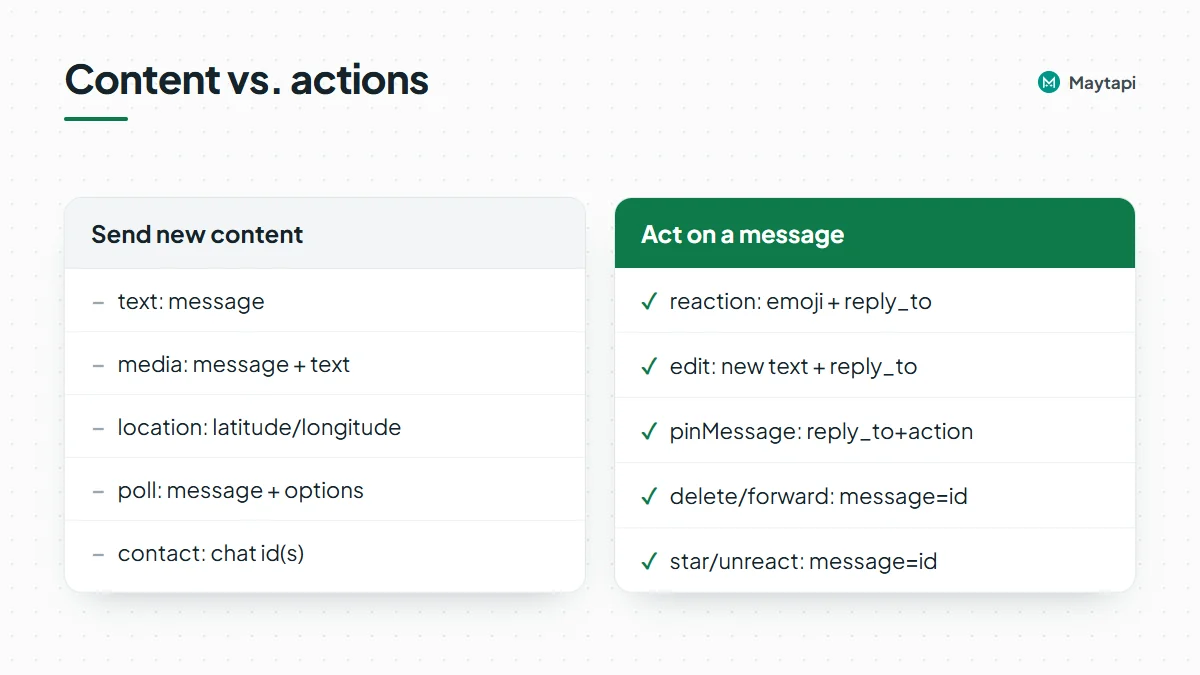
React and unreact. The emoji goes in message and the target in reply_to. To remove your reaction, send unreact with the target id in message:
{ "to_number": "1415xxxxx67@c.us", "type": "reaction", "message": "👍", "reply_to": "false_1415xxxxx67@c.us_3EB0A81ECEA6D47F2F13" }
{ "to_number": "1415xxxxx67@c.us", "type": "unreact", "message": "false_1415xxxxx67@c.us_3EB0A81ECEA6D47F2F13" }
Edit. Put the new text in message and the message you're editing in reply_to. You can only edit your own messages, and WhatsApp only allows edits for a limited time after sending:
{ "to_number": "1415xxxxx67@c.us", "type": "edit", "message": "Your order ships Monday (updated).", "reply_to": "50d8b950-a67f-11eb-91cc-d97af631df95" }
Delete. Pass the message id in message. Set deleteForEveryone explicitly: true removes the message for everyone, false only from your own chat:
{ "to_number": "1415xxxxx67@c.us", "type": "delete", "message": "50d8b950-a67f-11eb-91cc-d97af631df95", "deleteForEveryone": true }
Forward. to_number is the destination and message is the id of the message to forward. The documentation examples add forward_caption: true so media keeps its caption:
{ "to_number": "905301234569@c.us", "type": "forward", "message": "false_1415xxxxx67@c.us_3EB0A81ECEA6D47F2F13", "forward_caption": true }
Star. action: 1 stars the message in message, action: 2 unstars it.
Pin. pinMessage takes the target in reply_to, action: 1 to pin or action: 2 to unpin, and a duration of 86400, 604800 or 2592000 seconds (1, 7 or 30 days):
{ "to_number": "1415xxxxx67@c.us", "type": "pinMessage", "action": 1, "duration": 604800, "reply_to": "50d8b950-a67f-11eb-91cc-d97af631df95" }
Interactive, catalog, channel and group messages
sendMessage handles a few more families, each covered in its own guide:
- Buttons, lists and carousels (
buttons,list,carousel): WhatsApp interactive messages. - Products and your catalog (
product,catalog): WhatsApp catalog API and orders. - Channels (
channel_text,channel_media,channel_poll,channel_quizand more): WhatsApp channel API. - Groups, including mentions and
@all: send messages to a WhatsApp group.
Message type reference
type |
Required fields | Example value |
|---|---|---|
text |
message |
"Hello!" |
media |
message (URL or base64), optional text, filename |
"https://example.com/invoice.pdf" |
audio |
message (URL) |
"https://example.com/welcome.ogg" |
sticker |
message (URL) |
"https://example.com/thanks.webp" |
shortVideo |
message (URL) |
"https://example.com/hello.mp4" |
location |
latitude, longitude, optional text |
"41.093292", "29.061737" |
vcard |
message.displayName, message.vcard |
"BEGIN:VCARD\n..." |
contact |
message (chat id or array) |
"1415xxxxx68@c.us" |
link |
message (URL), optional text |
"https://example.com/track/1042" |
poll |
message, options, optional only_one |
["Morning", "Evening"] |
reaction |
message (emoji), reply_to |
"👍" |
unreact |
message (message id) |
"false_1415xxxxx67@c.us_3EB0..." |
edit |
message (new text), reply_to |
"Updated text" |
delete |
message (message id), deleteForEveryone |
true |
forward |
message (message id) |
"50d8b950-a67f-..." |
star |
message (message id), action |
1 star, 2 unstar |
pinMessage |
reply_to, action, duration |
604800 |
To quote a message, add reply_to to a text, media, voice note or poll message.
Track delivery with ack webhooks
Because sendMessage only queues the message, delivery shows up later on your webhook. With ack delivery turned on (ack_delivery in setWebhook), each receipt arrives as a type: "ack" event.
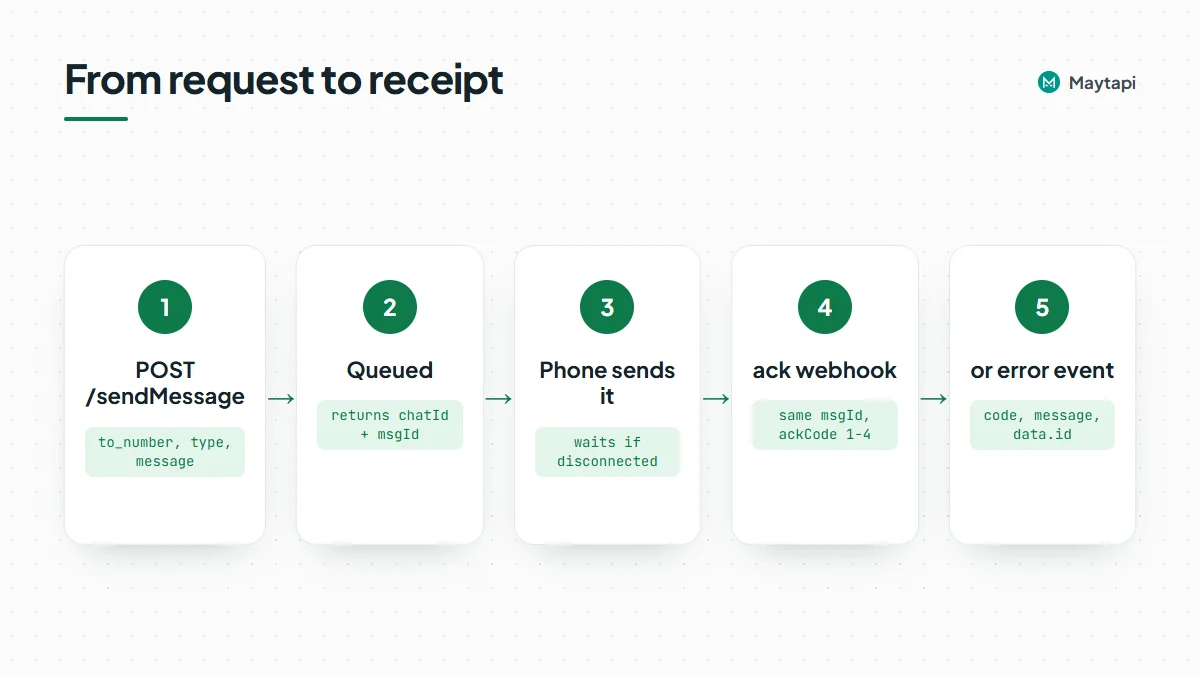
Each item in the event's data array has a msgId that matches the one sendMessage returned, plus an ackCode: 1 delivered (to WhatsApp's servers), 2 reached (the recipient's phone), 3 seen, 4 played (voice notes) and 5 deleted. Receipts can arrive more than once and out of order, so keep the highest ackCode per message.
A message that can't be sent arrives as a type: "error" event instead, with a code, a message, and the original request in data. Its data.id is the same msgId, so you can mark the right message as failed. The webhook events guide shows every payload and how to build a reliable handler.
Errors you should handle
Some problems are rejected right in the HTTP response:
Response message |
Cause |
|---|---|
to_number is missing..! |
No to_number in the body |
Invalid phone number |
to_number shorter than 10 characters (usernames excepted) |
body.type is required. |
No type in the body |
API token does not match! Please check your API token. |
Wrong or missing x-maytapi-key |
[PHONE_ID] is not a valid phone instance id... / You dont own the phone[...] |
Wrong phone ID in the URL |
Everything else is checked when your phone takes the message from the queue, so it comes back as an error webhook event:
code |
message |
What to do |
|---|---|---|
E01 |
The contact cannot be found! |
The number isn't on WhatsApp. Check the country code, or check numbers in advance with bulk number check. |
E01 |
Found Message Dupe. |
The duplicate filter dropped a repeated message (see below). It shares E01 with the row above, so branch on message as well as code. |
E02 |
Message type '...' is invalid... |
Typo in type. Compare against the table above. |
E03 |
Message is empty. |
message is missing or empty. |
M01 |
Can not found forwarded message. |
The message to forward isn't available to your phone. |
F12 |
This WhatsApp number is temporarily restricted... |
WhatsApp has limited new conversations. See ban prevention and Safe Mode. |
Group sends have their own codes, such as OA2 when your number isn't a member. A phone that's disconnected doesn't produce an error: as described above, the message waits in the queue.
sendMessage has a duplicate filter that drops the same content sent to the same chat several times in a short window. It protects your number from loops in your own code. If a repeat is intentional, add "skip_filter": true to that request rather than to every message.
Next steps
You now know every one-to-one message type and the field each one needs. To build on it:
- Build a bot that receives messages and answers with these types: WhatsApp bot with Node.js or WhatsApp bot with Python.
- Send to many people safely with queues, pacing and opt-outs: WhatsApp broadcast API.
- Handle acks, errors and incoming messages: WhatsApp webhook events guide.
- Look up every field and example body in the API documentation.