 Maytapi
WhatsApp multi-agent platform for your team
Connect your WhatsApp number once and let every agent answer from the same number. Conversations are shared, each agent takes and closes their own chats, and you see who handled what.
- one shared number
- unlimited conversations
- agent analytics
- works next to the API
Everything your support team needs
A shared inbox built on the same connection your API uses.
-
inbox
Shared inbox
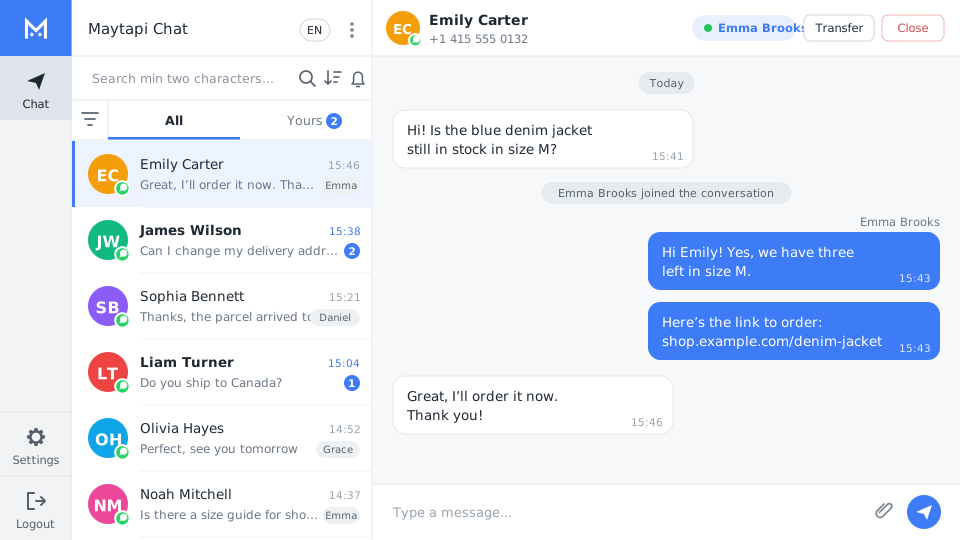
All WhatsApp conversations of your number in one place, visible to your agents.
-
agents
Multiple agents
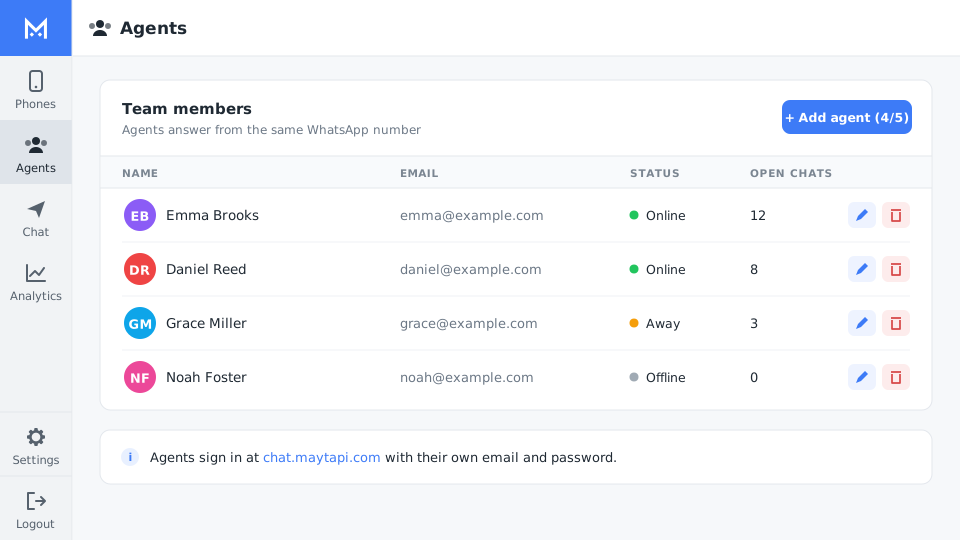
Add agents with an email and password; they sign in from their own browser.
-
status
Take and close
Agents take waiting conversations, reply and close them when the issue is solved.
-
analytics
Agent analytics
See waiting, taken and closed conversations and messages per agent.
Answer customers from one WhatsApp number
Every incoming message lands in the shared inbox. The “Yours” tab shows the conversations assigned to you, with unread counts, so nothing is answered twice or missed.
- ✓Text, images, files and links in the same chat view
- ✓Take, leave or end a conversation with one click
- ✓Your phone and WhatsApp Web keep working
Add your team in seconds
Create an agent with a name, email and password. Agents sign in on chat.maytapi.com and only see the chat screen — not your API keys or billing.
- ✓Edit or remove agents at any time
- ✓Add more agents by raising your agent limit
- ✓One agent is included for free
Connect your number with a QR code
Add a phone in the console and scan the QR code with WhatsApp. The same connection powers both the API and the live chat, so your automations keep running while agents reply.
- ✓Status of each number at a glance
- ✓No number migration or approval
- ✓Use webhooks and the API in parallel

Know how your team is doing
The analytics page shows the state of every conversation and how many issues each agent closed, so you can balance the workload.
- ✓Waiting, taken and closed conversations
- ✓Closed conversations per agent
- ✓Total messages and users
| Metric | What it shows |
|---|---|
| waiting | Conversations waiting for an agent |
| taken | Conversations an agent is handling |
| closed | Conversations closed, per agent |
| messages | Total messages in the period |
| users | Unique customers who wrote to you |
Who uses the multi-agent platform
-
Customer support
A support team answering customers from a single, well-known number.
-
E-commerce
Order questions answered by agents while the API sends shipping updates.
-
Agencies
Several people handling a client’s WhatsApp without sharing one phone.
Multi-agent platform FAQ
Ask our support team anything by email or through the help center. Average response time is under 24 hours.
Help center →Do agents need their own phone?
No. The number is connected once with a QR code; agents answer from their browser on chat.maytapi.com.
How many agents can I add?
One agent is free. To add more, increase your agent limit in the console subscription page.
Can I use the API and the live chat together?
Yes. Both use the same connection, so bots, webhooks and agents can work on the same number.
Can agents see my API token?
No. Agents only get the chat screen; product settings, tokens and billing stay in your console account.
More WhatsApp API features

Get your key, send your first message in ten minutes
No approval, no templates, no card. Every endpoint is open for three days.