Maytapi
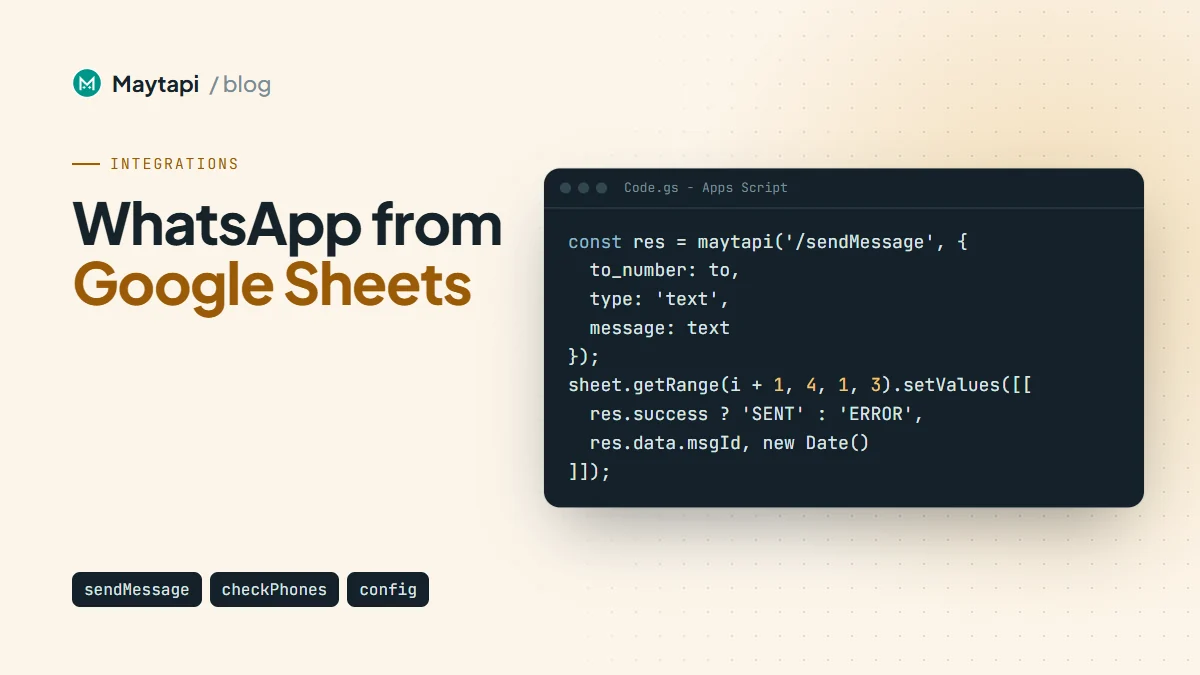
A spreadsheet is where most small teams already keep the list: customers to remind, students to notify, orders waiting for pickup. Copying those numbers into WhatsApp one by one doesn't scale, and a full CRM is more than many teams need. This guide shows two ways to send WhatsApp messages from Google Sheets with Maytapi: the ready-made Google Sheets Message Sender in the console for one-off sends, and a short Google Apps Script that personalizes each message, paces the sends on a timer, respects opt-outs and logs every reply back into the same spreadsheet.
Built-in sender or Apps Script
The Maytapi console has a no-code Google Sheets Message Sender under Integrations. You pick a connected phone, share your sheet with the service account email shown on the page, paste the sheet's URL and click Send Messages with Google Sheets. It reads columns A to G of the first tab and sends one message per row:
| Column | Content |
|---|---|
| A | Message type: text, media or poll |
| B | Recipient number, digits only with the country code, like 1415xxxxx67 |
| C | The text, a media URL or a base64 data URI, or the poll question |
| D | Caption for media rows, or the first poll option |
| E, F | Second and third poll options (polls support up to three) |
| G | TRUE for a poll that allows only one choice |
Rows where A, B or C is empty are skipped, so keep only message rows on that tab. The console asks for Editor access because it can write delivery status back to the sheet. The template file is on the same page under Download.
The built-in sender is the fastest route when the list is ready and you just want it sent. It doesn't log replies, and it sends the whole tab in one go, so pacing is left to your phone's sending queue and Safe Mode settings. When you want control over timing, opt-outs and replies, use Apps Script.
Note: Sending a whole sheet at once is the riskiest pattern for a WhatsApp number. Send only to contacts who opted in, and start with a few dozen rows before you send a full list.
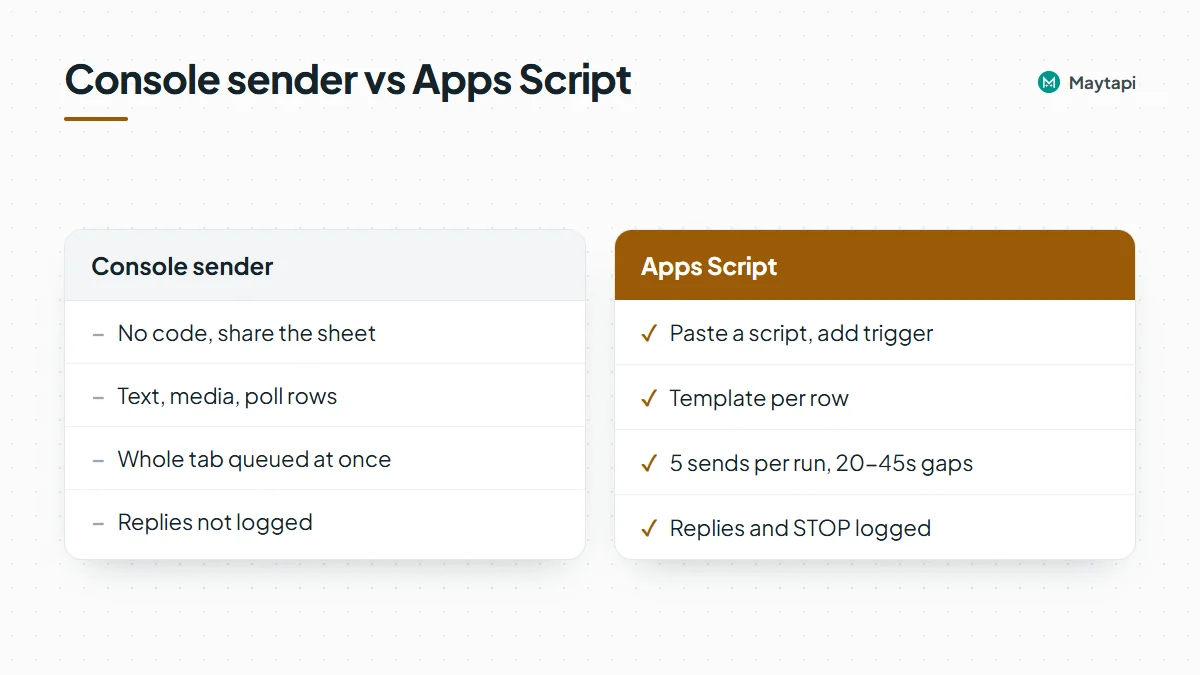
| Console sender | Apps Script | |
|---|---|---|
| Setup | No code, share the sheet | Paste a script, add a trigger |
| Message types | Text, media, poll | Anything sendMessage accepts |
| Personalization | Sheet formulas in column C | Template per row in code |
| Pacing | Whole tab queued at once | Small batches with random gaps |
| Replies and opt-outs | Not logged | Logged to a Replies tab |
How the Apps Script workflow fits together
Everything lives in one spreadsheet with three tabs and a script bound to it:
- Contacts:
phone,name,detail,status,msgId,sent_at, one row per person. - Replies: filled in by the webhook with the time, number, name and text of every reply.
- OptOut: numbers that answered STOP. Nothing is sent to them again.
A time-driven trigger runs sendBatch() every 10 minutes. Each run sends a few messages through POST /sendMessage, waits a random interval between them with Utilities.sleep, and writes the msgId and a status back to the row. The script is also deployed as a web app, and its doPost function is your Maytapi webhook: incoming messages are appended to Replies, and receipts update the status column.
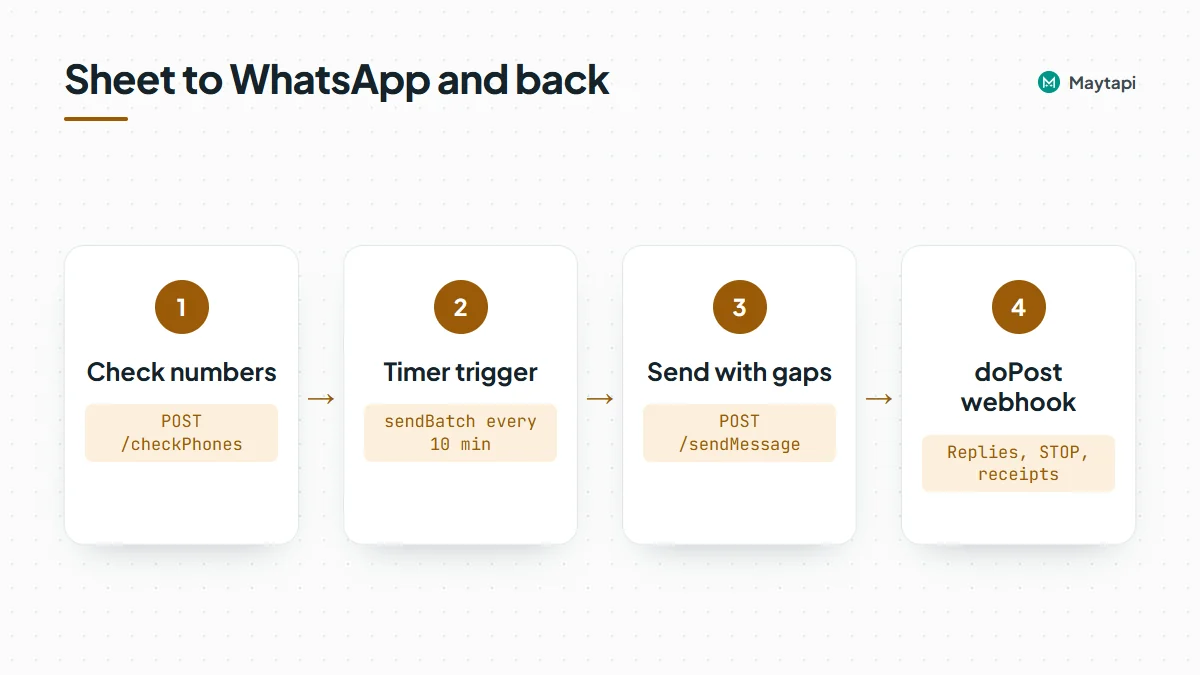
All Maytapi endpoints below live under https://api.maytapi.com/api/PRODUCT_ID/PHONE_ID/ and use your token in the x-maytapi-key header. If you haven't connected a number yet, start with getting started.
Store your credentials and call the API
Open the sheet, choose Extensions > Apps Script, and under Project Settings > Script properties add PRODUCT_ID, PHONE_ID, TOKEN and WEBHOOK_KEY (any long random string). Keeping them in script properties means they aren't visible to everyone who can read the code.
Format the phone column as plain text (Format > Number > Plain text) so Sheets doesn't turn long numbers into scientific notation. Numbers go in international format without +, like 1415xxxxx67.
A small helper wraps every call:
const PROPS = PropertiesService.getScriptProperties();
const PRODUCT_ID = PROPS.getProperty('PRODUCT_ID');
const PHONE_ID = PROPS.getProperty('PHONE_ID');
const TOKEN = PROPS.getProperty('TOKEN');
const BASE = `https://api.maytapi.com/api/${PRODUCT_ID}/${PHONE_ID}`;

function maytapi(path, body) {
  const res = UrlFetchApp.fetch(BASE + path, {
    method: 'post',
    contentType: 'application/json',
    headers: { 'x-maytapi-key': TOKEN },
    payload: JSON.stringify(body),
    muteHttpExceptions: true
  });
  return JSON.parse(res.getContentText());
}

const digits = (v) => String(v).replace(/\D/g, '');
Errors come back as JSON with success: false and a message, so check the body, not just the HTTP status.
Check the numbers first
Sends to numbers that aren't on WhatsApp fail and make your sending look colder than it is. Run new rows through POST /checkPhones once before the first send and mark the dead ones:
function checkNumbers() {
  const sheet = SpreadsheetApp.getActive().getSheetByName('Contacts');
  const rows = sheet.getDataRange().getValues();
  const todo = [];
  for (let i = 1; i < rows.length; i++) {
    if (rows[i][0] && !rows[i][3]) todo.push({ row: i + 1, phone: digits(rows[i][0]) });
  }
  for (let i = 0; i < todo.length; i += 50) {
    const chunk = todo.slice(i, i + 50);
    const res = maytapi('/checkPhones', { numbers: chunk.map((c) => c.phone) });
    if (!res.success) throw new Error(res.message);
    const valid = {};
    res.data.forEach((r) => { valid[r.id.user] = r.valid; });
    chunk.forEach((c) => {
      sheet.getRange(c.row, 4).setValue(valid[c.phone] ? 'READY' : 'NOT_ON_WHATSAPP');
    });
    Utilities.sleep(5000);
  }
}
Each item in data has valid (true or false), a status (valid or invalid) and an id whose user is the number you sent. The batch size of 50 is a starting point, not a documented limit. The bulk number check guide covers pacing for larger lists.
Send personalized messages in paced batches
sendBatch() picks up rows with status READY, skips anyone on the OptOut tab, and sends at most five messages per run with 20 to 45 seconds between them:
const BATCH_SIZE = 5;
const TEMPLATES = [
  'Hi {name}, this is Acme Store. Your order {detail} is ready for pickup. Reply STOP to opt out.',
  'Hello {name}! Acme Store here: order {detail} is packed and waiting for you. Reply STOP to stop these updates.'
];

function sendBatch() {
  const hour = Number(Utilities.formatDate(new Date(), Session.getScriptTimeZone(), 'H'));
  if (hour < 9 || hour >= 20) return; // quiet hours

  const lock = LockService.getScriptLock();
  if (!lock.tryLock(1000)) return; // previous run still busy
  try {
    const ss = SpreadsheetApp.getActive();
    const sheet = ss.getSheetByName('Contacts');
    const optOut = new Set(ss.getSheetByName('OptOut').getDataRange().getValues().map((r) => digits(r[0])));
    const rows = sheet.getDataRange().getValues();
    let sent = 0;

    for (let i = 1; i < rows.length && sent < BATCH_SIZE; i++) {
      const [phone, name, detail, status] = rows[i];
      if (status !== 'READY') continue;
      const to = digits(phone);
      if (optOut.has(to)) { sheet.getRange(i + 1, 4).setValue('OPTED_OUT'); continue; }

      const text = TEMPLATES[Math.floor(Math.random() * TEMPLATES.length)]
        .replace('{name}', name || 'there')
        .replace('{detail}', detail);
      const res = maytapi('/sendMessage', { to_number: to, type: 'text', message: text });

      sheet.getRange(i + 1, 4, 1, 3).setValues([[
        res.success ? 'SENT' : 'ERROR: ' + res.message,
        res.success ? res.data.msgId : '',
        new Date()
      ]]);
      SpreadsheetApp.flush();
      sent++;
      if (sent < BATCH_SIZE) Utilities.sleep(20000 + Math.random() * 25000);
    }
  } finally {
    lock.releaseLock();
  }
}
A few details matter here:
success: truemeans queued, not delivered.sendMessageadds the message to your phone's sending queue and returns achatIdand amsgIdright away. The receipt comes later on the webhook, which is why themsgIdis stored.- Each run stays short. Apps Script stops a run after six minutes, so five sends with up to 45 seconds between them fit comfortably. The lock stops two runs from overlapping.
- Every message is different. Names, order numbers and two rotating phrasings keep the text from looking like a bulk blast. The broadcast guide explains why that matters.
Create the trigger once by running this function from the editor:
function installTrigger() {
  ScriptApp.newTrigger('sendBatch').timeBased().everyMinutes(10).create();
}
That's at most 30 messages an hour during the sending window. Google limits the total daily runtime of triggers, with a lower limit on free Gmail accounts than on Workspace, and most of each run here is spent sleeping, so check Google's current Apps Script quotas before you scale up. On a new number, turn on Safe Mode as well: it delays messages in the queue when they come too fast, whatever your script does. The ban prevention guide covers the settings.
Log replies and opt-outs with doPost
To get replies into the sheet, add a doPost function and deploy the script as a web app (Deploy > New deployment > Web app, execute as Me, access Anyone). Apps Script doesn't expose request headers to doPost, so the secret goes in the URL as a query parameter. That key is the only thing protecting a public URL that writes into your sheet, and it is also stored in your Maytapi webhook settings, so treat the whole URL as a secret and change the key if the URL leaks:
function doPost(e) {
  if (e.parameter.key !== PROPS.getProperty('WEBHOOK_KEY')) return ContentService.createTextOutput('ignored');
  const body = JSON.parse(e.postData.contents);
  const ss = SpreadsheetApp.getActive();
  const lock = LockService.getScriptLock();
  lock.waitLock(5000);
  try {
    if (body.type === 'message' && body.message && !body.message.fromMe
        && !String(body.conversation).endsWith('@g.us')) {
      const m = body.message;
      const phone = (body.user && body.user.phone) || '';
      const text = m.type === 'text' ? m.text : '[' + m.type + ']';
      ss.getSheetByName('Replies').appendRow([new Date(), phone, body.user && body.user.name, text, m.id]);

      if (/^(stop|unsubscribe)$/i.test(String(text).trim())) {
        ss.getSheetByName('OptOut').appendRow([phone, new Date()]);
      }
    }

    if (body.type === 'ack' && Array.isArray(body.data)) {
      const contacts = ss.getSheetByName('Contacts');
      body.data.forEach((a) => {
        const cell = contacts.createTextFinder(a.msgId).matchEntireCell(true).findNext();
        if (cell) contacts.getRange(cell.getRow(), 4).setValue(a.ackType.toUpperCase());
      });
    }
  } finally {
    lock.releaseLock();
  }
  return ContentService.createTextOutput('ok');
}
Copy the web app URL, add ?key= with your secret, and point Maytapi at it. To avoid replacing the webhook other systems on your product use, give just this phone its own URL with POST /config:
curl -X POST "https://api.maytapi.com/api/$PRODUCT_ID/$PHONE_ID/config" \
  -H "x-maytapi-key: $TOKEN" \
  -H "Content-Type: application/json" \
  -d '{"webhook": "https://script.google.com/macros/s/DEPLOYMENT_ID/exec?key=YOUR_SECRET", "ack_delivery": true}'
POST /setWebhook at product level works too if the sheet is your only consumer. When you set a product webhook, Maytapi first posts a sample text message from 905801234567 to check the URL. That check arrives wrapped in a body key, so doPost sees no top-level type and writes no row for it; the first row you see is a real reply.
What arrives in doPost:
| Event | Fields the script uses |
|---|---|
type: "message" |
conversation, user.phone, user.name, message.type, message.text, message.id, message.fromMe |
type: "ack" |
data[] with msgId, ackType (delivered, reached, seen, played, deleted) and ackCode 1 to 5 |
Receipts can arrive more than once and out of order, so a row may briefly show REACHED after SEEN. If that bothers you, keep the highest ackCode instead of the latest. Some contacts arrive with an @lid id instead of a phone number. LID to phone number explains how to match them. Edit the code and use Manage deployments > Edit > New version, or the URL keeps serving the old code.
Practical tips
- Ask for a typed reply. "Reply 1 to confirm, 2 to reschedule" arrives as a plain
textmessage on every connection and lands in Replies as-is. Reply-button taps may not arrive as webhook events on every connection. - Honor STOP before anything else. The OptOut tab is checked on every run, so a number that opts out at 10:02 is skipped from 10:10 on.
- Keep the webhook fast. Maytapi waits a limited time for your endpoint. A few
appendRowcalls are fine. Don't call other APIs fromdoPost. - Start small. Send to a few dozen opted-in contacts who already chat with you, watch the Replies and status columns, and only then widen the list.
Next steps
One spreadsheet, one script and two Maytapi endpoints give you personalized sends, paced delivery and a reply log your whole team can read. Try it on the 3-day free trial, no card needed.
- Plan volume, personalization and opt-outs with the WhatsApp broadcast API guide.
- Keep a new number safe with ban prevention and Safe Mode.
- Clean large lists before a campaign with the bulk WhatsApp number check.
- See every payload
doPostcan receive in the webhook events guide. - Prefer a visual builder? The Make integration guide watches new sheet rows without code.