Maytapi
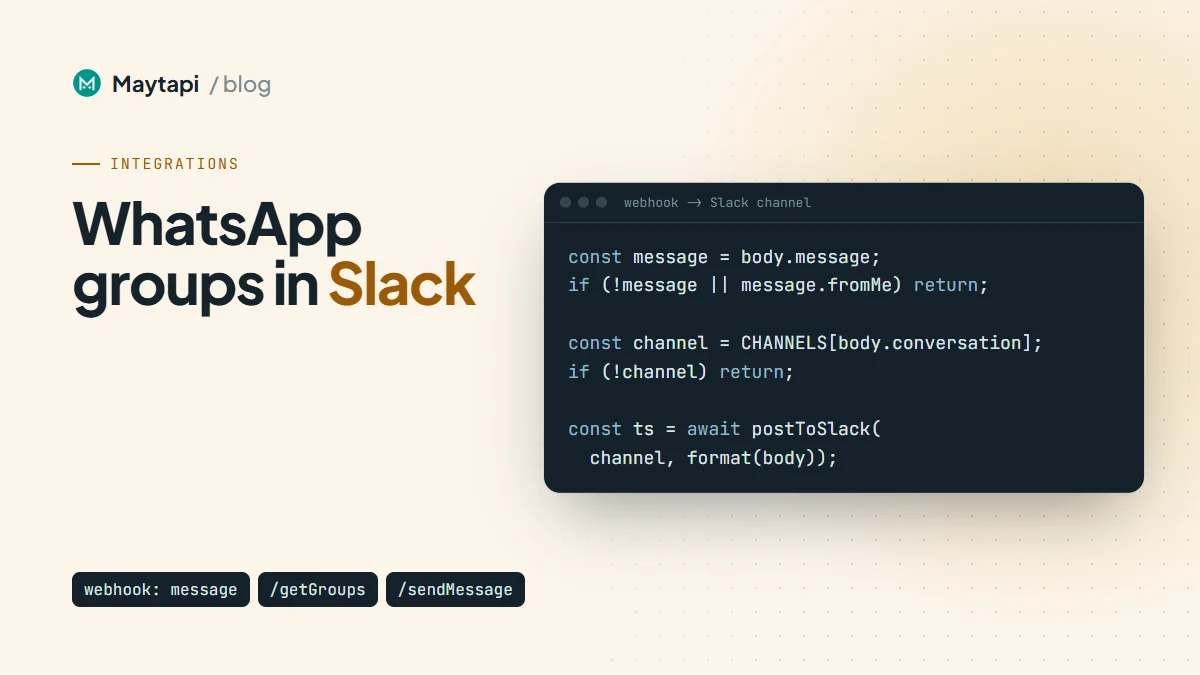
Many teams run part of their support or operations inside WhatsApp groups: a group per key customer, a group with field technicians, a group with couriers or suppliers. The conversations matter, but they live on one phone, and the rest of the team works in Slack. This guide shows how to forward WhatsApp group messages to Slack channels with a Maytapi webhook and a small Node.js server: map each group to a channel, post the sender, the text and a link to any media, skip your own messages, and, as an optional extra, answer from a Slack thread back into the WhatsApp group. It's a WhatsApp Slack integration you own end to end.
Note: You will be copying group members' messages, names and files into Slack. Tell the members of each mirrored group, and limit the Slack channels to the people who need them.
How the forwarding works
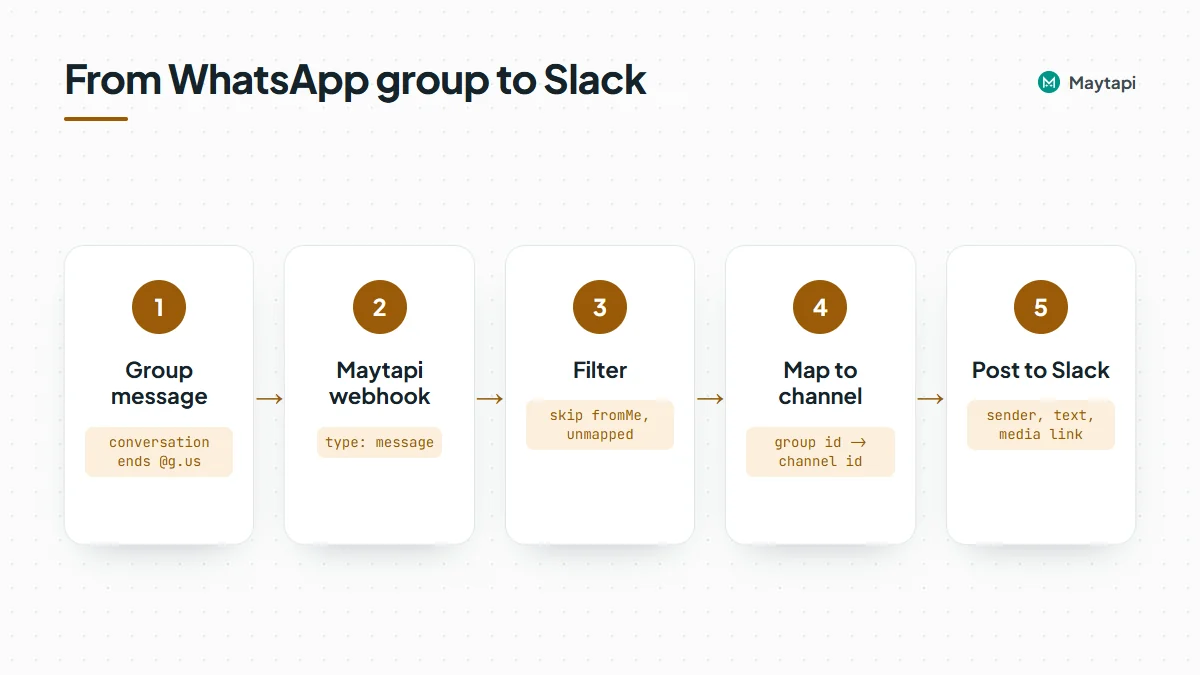
The flow has three parts, and Maytapi only needs to be configured once:
- Your number is in the WhatsApp groups you want to mirror. It does not need to be an admin, because receiving group messages works for any member.
- Maytapi posts every incoming message to your webhook URL as a
messageevent. Group messages carry the group id, ending in@g.us, inconversation. - Your server looks up which Slack channel belongs to that group and posts a formatted message there.
| What you need | Where it comes from |
|---|---|
| Maytapi product id, phone id and token | Maytapi console |
| A webhook URL pointing at your server | POST /setWebhook or the console's Developers > Webhook page |
| The group ids you want to forward | GET /getGroups |
| A Slack Incoming Webhook URL, or a Slack app bot token | Your Slack app settings at api.slack.com |
All Maytapi endpoints live under https://api.maytapi.com/api/PRODUCT_ID/PHONE_ID/ and use your token in the x-maytapi-key header. If you haven't connected a number yet, start with getting started.
To find the group ids, list your groups:
curl "https://api.maytapi.com/api/$PRODUCT_ID/$PHONE_ID/getGroups?sort=true&page=1" \
  -H "x-maytapi-key: $TOKEN"
Each group in data has an id (like 120363012345678901@g.us) and a name. Those ids are the keys of your group-to-channel map. The group API guide covers the rest of the response.
What a group message webhook contains
Here is an image someone posted in a group, as your webhook receives it (the participants list is left out for brevity):
{
  "type": "message",
  "product_id": "1a2b3c4d-...",
  "phone_id": 12345,
  "conversation": "120363012345678901@g.us",
  "conversation_name": "Acme - Support",
  "user": { "id": "1415xxxxx67@c.us", "name": "Ayse", "phone": "1415xxxxx67" },
  "message": {
    "type": "image",
    "url": "https://cdn.maytapi.com/...",
    "mime": "image/jpeg",
    "caption": "Error on the checkout screen",
    "id": "false_120363012345678901@g.us_3EB0A81ECEA6D47F2F13_1415xxxxx67@c.us",
    "fromMe": false
  },
  "receiver": "1415xxxxx21",
  "timestamp": 1761552000,
  "reply": "https://api.maytapi.com/api/1a2b3c4d-.../12345/sendMessage"
}
The fields you'll use for Slack:
| Field | Use |
|---|---|
conversation |
The group id. Look up the Slack channel with it |
conversation_name |
The group's name, handy as a heading or fallback label |
user.name, user.phone |
Who wrote the message. name falls back to the number when no name is known |
message.type |
text, image, video, document, audio, ptt (voice note), sticker and more |
message.text |
The body of a text message |
message.url, message.caption, message.filename, message.mime |
Media messages: a link to the file, its caption, name and type |
message.id |
The full message id. Save it if you want to reply to this message later |
message.fromMe |
true for messages sent from your own number. Skip these |
Two details to plan for. First, the media url is usually a direct file link. For very large files it can instead be an api_media link that fetches the file from your connected phone the first time it's opened, so it only works while the phone is connected. Second, group members who hide their number can arrive with an @lid id, and then user.phone isn't a phone number. LID to phone number explains how to handle them. Show the name and treat the number as best effort. Media links are not guaranteed to stay available forever, so if Slack history must keep the files, download them (see download WhatsApp media) and upload them to the channel with Slack's files.uploadV2 instead of posting the link.
Groups also produce events that aren't chat messages: members joining or leaving (type: "info" with a group/... subtype), reactions, poll votes, edits. Decide which ones your channel should see. Most teams forward only real messages and drop the rest. The webhook guide lists every type.
Choose how to post to Slack
Slack gives you two standard ways to post into a channel.
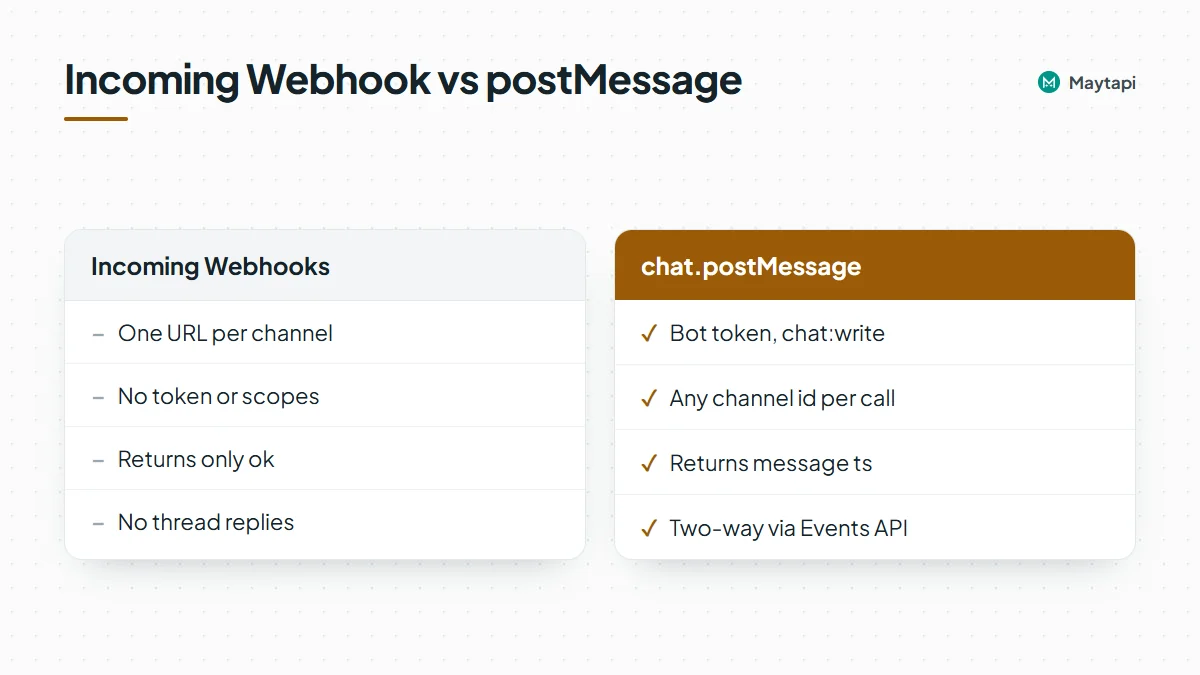
Incoming Webhooks. You create a Slack app, turn on Incoming Webhooks and add one webhook per channel. Each webhook URL posts to one fixed channel, and you send it {"text": "..."}. No token handling, no scopes. The catch: the response is just ok, so you don't get the posted message's id back, and you can't thread replies to it later.
The Web API's chat.postMessage. You install the app with the chat:write scope, invite the bot to each channel and call https://slack.com/api/chat.postMessage with a bot token, the channel id and the text. The response includes ts, the message's timestamp id in Slack. You need that ts if you want two-way replies.
| Incoming Webhooks | chat.postMessage |
|
|---|---|---|
| Setup | One URL per channel | One bot token, bot invited to channels |
| Channel choice | Fixed per URL | Any channel id per call |
| Returns the Slack message id | No | Yes, as ts |
| Two-way replies from threads | No | Yes, with the Events API |
If you only need visibility, Incoming Webhooks are enough. The example below uses chat.postMessage so you can add replies later without rewriting anything.
Forward group messages with Node.js
The server below receives Maytapi webhooks, keeps only real messages from mapped groups, formats them and posts them to Slack. It uses Express and the built-in fetch of Node 18+.
import express from "express";
const { PRODUCT_ID, PHONE_ID, TOKEN, SLACK_BOT_TOKEN } = process.env;
// WhatsApp group id -> Slack channel id
const CHANNELS = {
"120363012345678901@g.us": "C0123SUPPORT",
"120363012345678902@g.us": "C0456FIELDOPS"
};
const FORWARD = new Set(["text", "image", "video", "document", "audio", "ptt", "sticker"]);
// Slack ts -> original WhatsApp message (for optional replies)
const threads = new Map();
const app = express();
app.use(express.json({ verify: (req, res, buf) => { req.rawBody = buf; } }));
const esc = (s = "") => s.replace(/&/g, "&").replace(/</g, "<").replace(/>/g, ">");
function format(body) {
const { user = {}, message } = body;
const who = `*${esc(user.name || user.phone || "Unknown")}* (${esc(user.phone || "")})`;
if (message.type === "text") return `${who}\n${esc(message.text)}`;
const label = esc(message.filename || message.type);
const link = message.url ? `<${message.url}|${label}>` : `_${message.type} without a link_`;
const caption = message.caption ? `\n${esc(message.caption)}` : "";
return `${who} sent ${message.type}: ${link}${caption}`;
}
async function postToSlack(channel, text) {
const r = await fetch("https://slack.com/api/chat.postMessage", {
method: "POST",
headers: {
Authorization: `Bearer ${SLACK_BOT_TOKEN}`,
"Content-Type": "application/json; charset=utf-8"
},
body: JSON.stringify({ channel, text })
});
const res = await r.json();
if (!res.ok) throw new Error(res.error);
return res.ts;
}
app.post("/maytapi/webhook/7f3c9a", async (req, res) => {
res.sendStatus(200); // answer fast, work afterwards
const body = req.body;
if (body.type !== "message" || body.product_id !== PRODUCT_ID) return;
const message = body.message;
if (!message || message.fromMe) return;
const channel = CHANNELS[body.conversation];
if (!channel || !FORWARD.has(message.type)) return;
try {
const ts = await postToSlack(channel, format(body));
threads.set(ts, { conversation: body.conversation, messageId: message.id });
} catch (err) {
console.error("Slack post failed:", err.message);
}
});
app.listen(3000);
Point Maytapi at it once:
curl -X POST "https://api.maytapi.com/api/$PRODUCT_ID/setWebhook" \
  -H "x-maytapi-key: $TOKEN" \
  -H "Content-Type: application/json" \
  -d '{"webhook": "https://example.com/maytapi/webhook/7f3c9a"}'
Why the filters matter
fromMe. Messages sent from your number, from the phone or through the API, also reach your webhook withfromMe: true. Skipping them keeps your own replies from being posted twice, and it is what prevents a loop once you add replies from Slack.- The channel map. Your number may be in dozens of groups, plus private chats. Only ids you list in
CHANNELSget forwarded, so a new group never leaks into a Slack channel by accident. - The type list.
FORWARDdrops join and leave notices, reactions and poll votes. Addinfoif you want membership changes in the channel too. - Escaping. Slack treats
&,<and>as control characters in message text, so escape them in anything that came from WhatsApp.
Using Incoming Webhooks instead
If you went with Incoming Webhooks, map each group to its webhook URL and replace postToSlack with a plain POST:
const HOOKS = {
  "120363012345678901@g.us": process.env.SLACK_HOOK_SUPPORT
};

await fetch(HOOKS[body.conversation], {
  method: "POST",
  headers: { "Content-Type": "application/json" },
  body: JSON.stringify({ text: format(body) })
});
Everything else stays the same, except that there is no ts to store, so the reply section below doesn't apply.
Optional: reply from Slack back to the group
With chat.postMessage you can let the team answer from Slack. Someone replies in the thread under a forwarded message, and your server sends that text to the WhatsApp group as a reply to the original message. This uses Slack's Events API: subscribe your app to the message.channels bot event (add message.groups for private channels), give it the matching channels:history or groups:history scope, and set the Request URL to your server.
import crypto from "node:crypto";

const BASE = `https://api.maytapi.com/api/${PRODUCT_ID}/${PHONE_ID}`;

function fromSlack(req) {
  const ts = req.get("X-Slack-Request-Timestamp");
  if (!ts || Math.abs(Date.now() / 1000 - Number(ts)) > 300) return false;
  const expected = "v0=" + crypto
    .createHmac("sha256", process.env.SLACK_SIGNING_SECRET)
    .update(`v0:${ts}:${req.rawBody}`)
    .digest("hex");
  const got = req.get("X-Slack-Signature") || "";
  return got.length === expected.length &&
    crypto.timingSafeEqual(Buffer.from(got), Buffer.from(expected));
}

app.post("/slack/events", async (req, res) => {
  if (!fromSlack(req)) return res.sendStatus(401);
  const { type, challenge, event } = req.body;
  if (type === "url_verification") return res.json({ challenge });
  res.sendStatus(200);

  if (!event || event.type !== "message" || event.subtype || event.bot_id) return;
  const origin = event.thread_ts && threads.get(event.thread_ts);
  if (!origin) return;

  await fetch(`${BASE}/sendMessage`, {
    method: "POST",
    headers: { "x-maytapi-key": TOKEN, "Content-Type": "application/json" },
    body: JSON.stringify({
      to_number: origin.conversation,
      type: "text",
      message: event.text,
      reply_to: origin.messageId
    })
  });
});
How the pieces fit:
to_numberis the group id, which is howsendMessagetargets a group. See send a message to a WhatsApp group.reply_totakes the full message id from the webhook, so the answer appears in WhatsApp quoting the customer's message.- Only thread replies under a forwarded message are sent. Top-level messages in the channel stay internal, which keeps team chatter out of the customer's group.
- Bot messages (
bot_id) and edits or deletions (subtype) are ignored, and the reply comes back to your Maytapi webhook withfromMe: true, where the first filter drops it. No loops in either direction.
Slack sends text in its own format, so a user mention arrives as <@U012AB3CD> and & as &. Clean those up before sending if your team uses them. Also keep in mind that everyone in the Slack channel can now write to the group as your number, so use this only in channels where that's intended.
Keep it reliable
A forwarder that runs for months needs a few extra habits:
- Store the thread map. The
threadsMap lives in memory and is lost on restart. In production, keep Slacktsto WhatsAppmessage.idin Redis or your database, with an expiry of a few days. - Answer webhooks fast. Send
200first and post to Slack afterwards, so a slow Slack call never holds up a webhook. On the Slack side this matters even more: Slack retries events that aren't acknowledged within three seconds. - Don't post twice. Keep
message.idfor a while and skip ids you've already forwarded, in case an event reaches you more than once. - Respect Slack's rate limits.
chat.postMessageallows roughly one message per second per channel. For busy groups, queue messages per channel instead of firing them all at once. - Watch the connection. If the phone disconnects, nothing reaches Slack. Handle
type: "status"events from the same webhook and post an alert to an ops channel when the number goes toqr-screen,idleorphone-error. - Mind privacy. You're copying customer messages and file links into another tool. Make sure the group members are fine with that, and limit the Slack channels to the people who need them.
Next steps
Forwarding WhatsApp groups to Slack takes one webhook, a group-to-channel map and a short formatting function. Start with visibility, then add thread replies when the team is ready to answer from Slack.
- Prefer no code? Build the same flow in n8n with the Maytapi trigger and n8n's Slack node, following the n8n WhatsApp automation guide.
- See every event your server can receive in the webhook events guide.
- Find and manage group ids with the group API guide.
- Learn the options for posting into groups in send a message to a WhatsApp group.
- Resolve hidden member numbers with LID to phone number.
- Build a full webhook server with the WhatsApp bot in Node.js guide, and check parameters in the API documentation.
- Mirror your first group on the 3-day free trial.