Maytapi
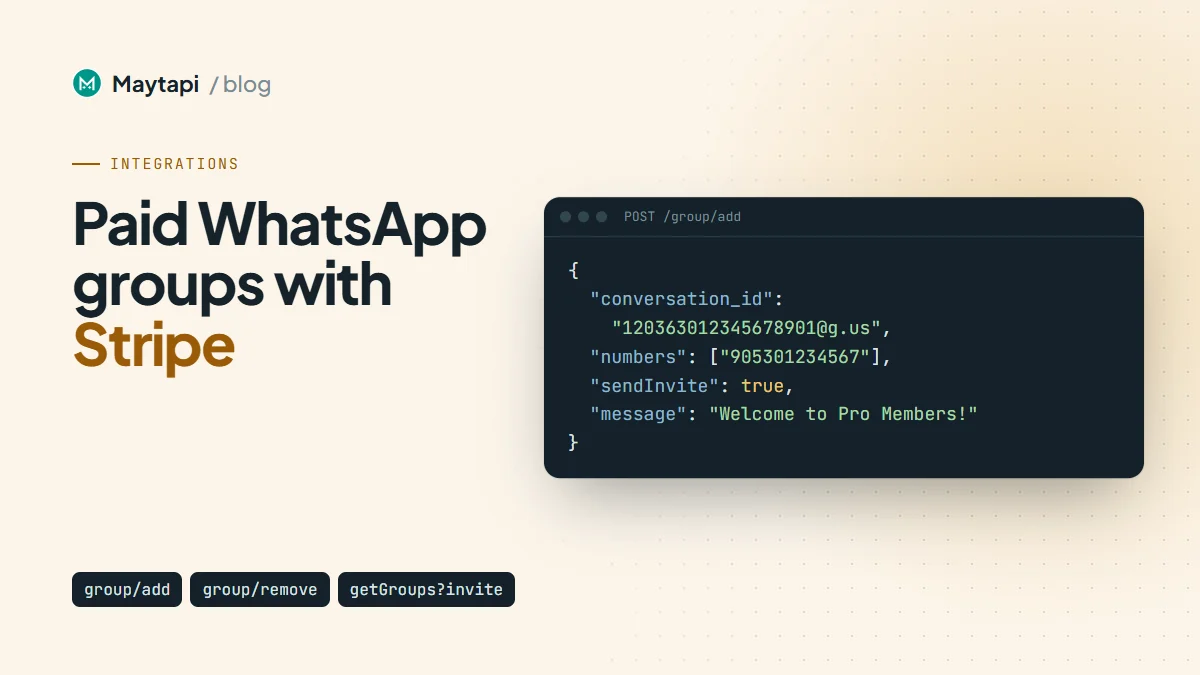
A paid WhatsApp group sounds simple: someone pays, they get in, and when they stop paying, they're out. Done by hand, it turns into a spreadsheet of numbers, a backlog of "I paid but I'm not in the group yet" messages, and former members who stay in for months because nobody remembered to remove them. This guide connects Stripe to a WhatsApp group with the Maytapi API so membership follows the subscription: the buyer is added when checkout completes, gets the invite link if WhatsApp won't let you add them, and is removed when the subscription ends.
How the pieces fit together
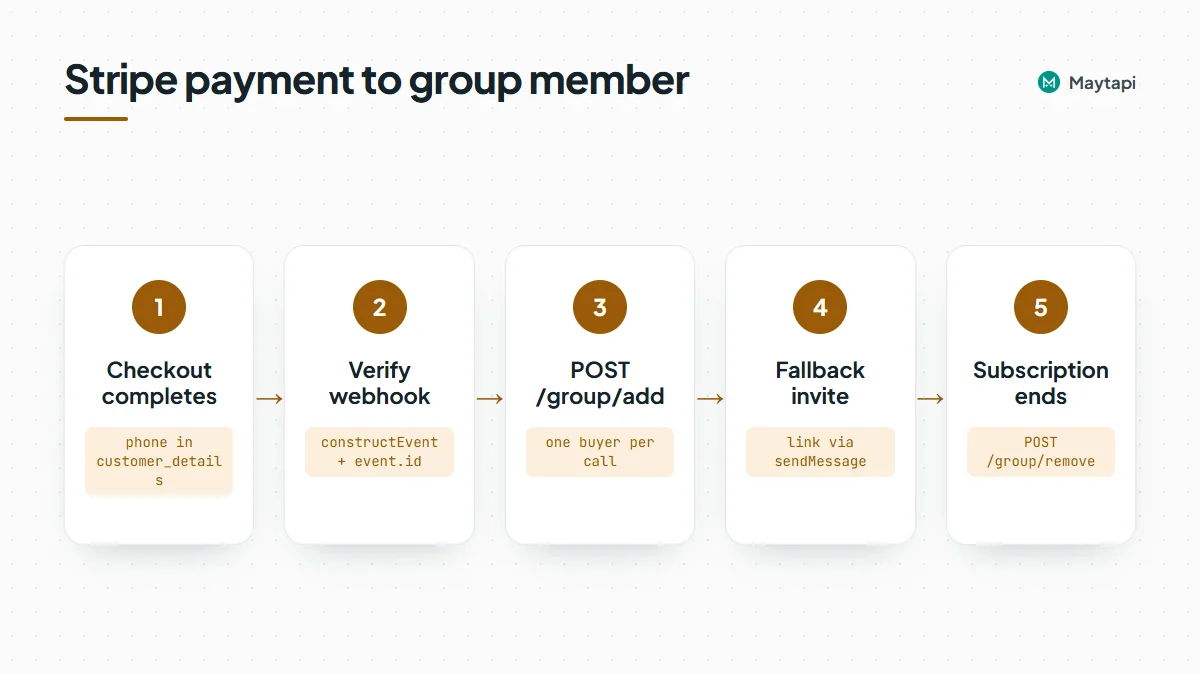
There is no Maytapi app to install in Stripe. The integration is two webhooks and a small table you own:
- The customer pays on Stripe Checkout. Checkout collects their phone number along with the payment.
- Stripe calls your server with
checkout.session.completed. You verify the signature, save the phone number next to the subscription ID, and callPOST /group/add. - If WhatsApp refuses the add because of the person's privacy settings, you send them the group's invite link in a private message.
- When the subscription ends, Stripe sends
customer.subscription.deleted. You look up the phone number and callPOST /group/remove.
All Maytapi calls use the base URL https://api.maytapi.com/api/PRODUCT_ID/PHONE_ID/ and your token in the x-maytapi-key header. The connected number must be an admin of the group, since only admins can add and remove members.
| Step | Stripe event | Maytapi endpoint |
|---|---|---|
| Grant access | checkout.session.completed |
POST /group/add |
| Check membership | GET /getGroups/{conversation_id} |
|
| Get the invite link | GET /getGroups/{conversation_id}?invite=true |
|
| Send the link privately | POST /sendMessage |
|
| Revoke access | customer.subscription.deleted |
POST /group/remove |
| Reset a leaked link | POST /group/revokeInvite |
Prepare the group and Stripe Checkout
Create the group once (or use an existing one) and note its ID, which ends in @g.us. The group API guide shows how to create it and find IDs with getGroups. Then lock it down so only admins can add people:
curl -X POST "https://api.maytapi.com/api/$PRODUCT_ID/$PHONE_ID/group/config" \
  -H "x-maytapi-key: $TOKEN" \
  -H "Content-Type: application/json" \
  -d '{
    "conversation_id": "120363012345678901@g.us",
    "config": { "membersCanAddMembers": false }
  }'
On the Stripe side, create the Checkout Session in subscription mode and turn on phone number collection, so the number arrives in the webhook as customer_details.phone:
const session = await stripe.checkout.sessions.create({
  mode: "subscription",
  line_items: [{ price: "price_123", quantity: 1 }],
  phone_number_collection: { enabled: true },
  success_url: "https://example.com/welcome",
  cancel_url: "https://example.com/pricing"
});
Stripe returns the number in international format, for example +1415xxxxx67. Maytapi wants digits only, country code first, so strip everything that isn't a digit before you store it.
Store the subscription to phone mapping
Every later decision depends on knowing which WhatsApp number belongs to which subscription. Keep one row per subscription:
| Column | Example | Why |
|---|---|---|
subscription_id |
sub_1Q... |
Key for the cancellation event |
customer_id |
cus_Q... |
Find the member from Stripe's dashboard |
phone |
1415xxxxx67 |
Digits only, used for every Maytapi call |
group_id |
120363012345678901@g.us |
Lets one server run several paid groups |
status |
active, invited, removed |
What your app last did |
Add a second table of processed Stripe event IDs. Stripe can deliver the same event more than once, and it retries any delivery your endpoint didn't acknowledge. Storing event.id after a successful run lets you skip duplicates without thinking about them.
Add the buyer when checkout completes
Here is the whole receiver in Node.js with Express and the official stripe package. The Stripe route must read the raw request body, because the signature check runs on the exact bytes Stripe sent.
import express from "express";
import Stripe from "stripe";

const stripe = new Stripe(process.env.STRIPE_SECRET_KEY);
const endpointSecret = process.env.STRIPE_WEBHOOK_SECRET;
const { PRODUCT_ID, PHONE_ID, TOKEN } = process.env;

const BASE = `https://api.maytapi.com/api/${PRODUCT_ID}/${PHONE_ID}`;
const headers = { "x-maytapi-key": TOKEN, "Content-Type": "application/json" };
const GROUP_ID = "120363012345678901@g.us";

const app = express();

app.post("/stripe/webhook", express.raw({ type: "application/json" }), async (req, res) => {
  let event;
  try {
    event = stripe.webhooks.constructEvent(req.body, req.headers["stripe-signature"], endpointSecret);
  } catch (err) {
    return res.status(400).send(`Webhook Error: ${err.message}`);
  }

  if (await db.eventSeen(event.id)) return res.sendStatus(200);
  try {
    await handle(event);
    await db.markEventSeen(event.id);
    res.sendStatus(200);
  } catch (err) {
    console.error(event.type, err.message);
    res.sendStatus(500); // Stripe will retry
  }
});

async function handle(event) {
  const obj = event.data.object;

  if (event.type === "checkout.session.completed") {
    if (obj.mode !== "subscription") return;
    const phone = (obj.customer_details?.phone || "").replace(/\D/g, "");
    if (!phone) return db.flagForManualReview(obj.id);

    await db.upsertMember({ subscription_id: obj.subscription, customer_id: obj.customer, phone, group_id: GROUP_ID });
    const result = await grantAccess(phone);
    await db.setStatus(obj.subscription, result === "invited" ? "invited" : "active");
  }

  if (event.type === "customer.subscription.deleted") {
    const member = await db.findBySubscription(obj.id);
    if (!member || member.status === "removed") return;
    await revokeAccess(member.phone);
    await db.setStatus(obj.id, "removed");
  }
}

app.listen(3000);
db stands for your own storage. Keep express.json() off this route, or apply it only to your other routes, otherwise the body is parsed before Stripe's check sees it and every signature fails.
What group/add tells you
The add call takes the group ID and the buyer's number. Add one buyer per call, which makes the response easy to read:
async function maytapi(path, body) {
  const opts = body ? { method: "POST", headers, body: JSON.stringify(body) } : { headers };
  const r = await fetch(`${BASE}/${path}`, opts);
  return r.json();
}

async function isMember(phone) {
  const res = await maytapi(`getGroups/${GROUP_ID}`);
  return !!res.success && (res.data.participants || []).includes(`${phone}@c.us`);
}

async function grantAccess(phone) {
  if (await isMember(phone)) return "already";

  const res = await maytapi("group/add", {
    conversation_id: GROUP_ID,
    numbers: [phone],
    sendInvite: true,
    message: "Welcome to Pro Members! Tap to join the group."
  });

  if (!res.success) {
    if (/ALREADY_EXISTS/.test(res.message || "")) return "already";
    throw new Error(`group/add failed: ${res.message}`);
  }

  if (res.data && (res.data.cannotAdd || res.data.inviteLink)) {
    await sendInviteLink(phone, res.data.inviteLink);
    return "invited";
  }
  return "added";
}
There are three outcomes to handle:
- Added.
successistrueanddatahas neithercannotAddnorinviteLink. The person is in the group. Depending on the connection,dataistrueor the updated group object, so don't rely on its exact shape. - Not added.
successis stilltrue, butdataincludesinviteLink, and usually acannotAddobject whosecannotAddedarray lists the numbers that failed. This is what happens when someone's privacy settings only allow contacts to add them, or when the number isn't on WhatsApp. WithsendInvite: true, people blocked by privacy also receive WhatsApp's own invitation card with yourmessage. - Call failed.
successisfalseandmessageexplains why: the group wasn't found, your number isn't an admin, or the Safe Mode tier blocked the change. On some connections, adding someone who is already a member also comes back assuccess: falsewith an "already exists" message, which is why the code checks membership first and treats that message as done.
Pass sendInvite: true explicitly. Don't rely on a default.
Send the invite link when the add fails
WhatsApp's invitation card is easy to miss, so follow it with a plain message that has the link. The add response usually carries inviteLink already. If it doesn't, read it from the group:
async function sendInviteLink(phone, link) {
  if (!link) {
    const res = await maytapi(`getGroups/${GROUP_ID}?invite=true`);
    link = res.success && res.data.invite;
  }
  if (!link) throw new Error("No invite link available");

  await maytapi("sendMessage", {
    to_number: phone,
    type: "text",
    message: `Thanks for subscribing! Join the members group here: ${link}`
  });
}
invite holds the https://chat.whatsapp.com/... link, or false when your number can't get one (usually because it isn't an admin). The send message guide covers the rest of sendMessage.
If you want to catch typos before paying customers wonder where their invite went, check the number first with the bulk number check endpoints. A number that isn't on WhatsApp should go to manual review, not to a retry loop.
Remove the member when the subscription ends
Stripe sends customer.subscription.deleted when a subscription actually ends: immediately for an instant cancellation, or at the end of the paid period if the customer cancelled with cancel_at_period_end. That's the right moment to take access away. group/remove takes one participant in number, in chat ID form:
async function revokeAccess(phone) {
  const res = await maytapi("group/remove", {
    conversation_id: GROUP_ID,
    number: `${phone}@c.us`
  });
  if (!res.success && (await isMember(phone))) {
    throw new Error(`group/remove failed: ${res.message}`);
  }
}
The response is just success. It's false when the person is no longer a participant (they left on their own) as well as when the call genuinely failed, so the code checks membership before deciding it's an error. A member who already left counts as removed.
Don't confuse checkout.session.expired with a membership expiring. That event means a Checkout page was abandoned before payment. For fixed-length passes sold as one-time payments, store an end date in your table and run a daily job that calls the same revokeAccess for rows past it.
Failed renewals go through Stripe's retry settings. Depending on your configuration, the subscription moves to past_due or unpaid (reported in customer.subscription.updated) before it's cancelled. Whether you remove people at past_due or wait for deleted is a business decision. Waiting is friendlier, and the code above already handles it.
Optional: approval mode instead of direct adds
Direct adds keep the experience instant, but they can fail on privacy settings, and an invite link sent to one buyer can be forwarded to anyone. Approval mode closes that gap. Turn on approveNewMembers, show the invite link on your welcome page, and anyone who opens it becomes a pending request instead of a member:
curl -X POST "https://api.maytapi.com/api/$PRODUCT_ID/$PHONE_ID/group/config" \
  -H "x-maytapi-key: $TOKEN" \
  -H "Content-Type: application/json" \
  -d '{
    "conversation_id": "120363012345678901@g.us",
    "config": { "approveNewMembers": true }
  }'
A small job then lists requests with GET /group/approvalRequestList/{conversation_id} every minute or two, approves the numbers that have an active row in your table with POST /group/approvalRequest/Approve, and leaves or rejects the rest. WhatsApp doesn't send a webhook for new requests, so polling is how this works. The group join requests guide has the full loop. Approval mode and direct adds also work together: admins can still add buyers directly, and the link only needs approval for everyone else.
If a link leaks without approval mode on, reset it with POST /group/revokeInvite. The old link stops working, and the response returns the new one as data.inviteLink.
Make it safe to run twice
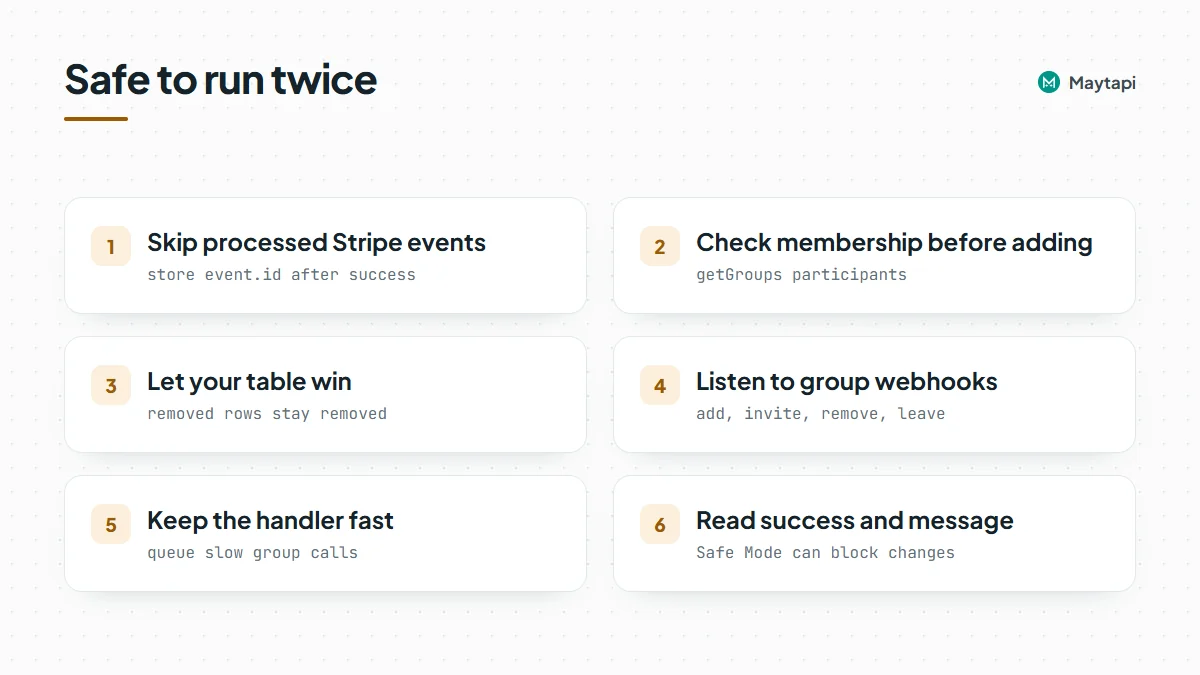
Webhooks arrive late, twice, or not in the order you expect. A few habits keep the group correct anyway:
- Skip processed events. Check
event.idbefore doing anything, and mark it only after the work succeeded, so a failed run is retried. - Check membership before adding.
getGroups/{conversation_id}returnsparticipantsas@c.usIDs. Some participants who hide their number show up as@lidIDs instead, andisMemberabove does not match those, so a member with a LID looks like a non-member and the add runs again. The "already exists" branch catches that case; to avoid the extra call, resolve LIDs first as the LID to phone number guide explains. Use?refresh=truewhen the list looks stale, not on every call. - Let your table win. Before acting on an event, read the subscription's row. If it says
removed, a latecheckout.session.completedretry shouldn't put them back. - Listen to the group too. Your Maytapi webhook receives
infomessages for membership changes, with the person inparticipant. A join arrives asgroup/addorgroup/invite(joined through a link; on some connections link joins also come asgroup/add), and a departure asgroup/removeorgroup/leave. Treat each pair the same way: move a row frominvitedtoactiveon a join, and note departures without touching the subscription. The webhook events guide lists the payloads. - Keep the handler fast. If group calls make your Stripe endpoint slow, save the event and process it from a queue, then return
200straight away.
To test the flow end to end, use the Stripe CLI: stripe listen --forward-to localhost:3000/stripe/webhook prints the webhook secret for local use, and stripe trigger checkout.session.completed sends a test event. Use a test group and your own second number while you're at it.
Adding and removing members changes the group, so on numbers in the stricter Safe Mode tiers these calls can be blocked or limited. Always read success and message instead of assuming the change happened.
Know the risk before you sell access. Maytapi is an unofficial API, so the connected number can be restricted by WhatsApp, and if it is, your paying members lose the admin that manages their group. Use a dedicated number rather than your personal one, keep a second admin or a fallback channel such as email, and tell buyers that group members can see each other's numbers.
Next steps
Stripe already knows who is paying. With two webhook events, a phone column and three Maytapi calls, your WhatsApp group knows it too, and nobody has to manage the member list by hand.
- Set up the group, its settings and admins with the group API guide.
- Gate the invite link with approval mode in the group join requests guide.
- Post announcements and polls to members with send a message to a WhatsApp group.
- Track joins and leaves with the webhook events guide.
- Check every parameter in the API documentation.